Table of Contents
- 14.1 Introduction to Replication
- 14.2 Replication Implementation Overview
- 14.3 Replication Implementation Details
- 14.4 How to Set Up Replication
- 14.5 Replication Compatibility Between MySQL Versions
- 14.6 Upgrading a Replication Setup
- 14.7 Replication Features and Issues
- 14.7.1 Replication and AUTO_INCREMENT
- 14.7.2 Replication and Character Sets
- 14.7.3 Replication and DIRECTORY Table Options
- 14.7.4 Replication and Floating-Point Values
- 14.7.5 Replication and FLUSH
- 14.7.6 Replication and System Functions
- 14.7.7 Replication and LIMIT
- 14.7.8 Replication and LOAD Operations
- 14.7.9 Replication and the Slow Query Log
- 14.7.10 Replication and Master or Slave Shutdowns
- 14.7.11 Replication and MEMORY Tables
- 14.7.12 Replication and Temporary Tables
- 14.7.13 Replication and User Privileges
- 14.7.14 Replication and the Query Optimizer
- 14.7.15 Replication and Reserved Words
- 14.7.16 Slave Errors During Replication
- 14.7.17 Replication Retries and Timeouts
- 14.7.18 Replication and Time Zones
- 14.7.19 Replication and Transactions
- 14.7.20 Replication and Variables
- 14.7.21 Other Replication Features
- 14.8 Replication and Binary Logging Options and Variables
- 14.9 How Servers Evaluate Replication Filtering Rules
- 14.10 Replication FAQ
- 14.11 Troubleshooting Replication
- 14.12 How to Report Replication Bugs or Problems
Replication capabilities enabling the databases on one MySQL server to be duplicated on another were introduced in MySQL 3.23.15. This chapter describes the various replication features provided by MySQL. It introduces replication concepts, shows how to set up replication servers, and serves as a reference to the available replication options. It also provides a list of frequently asked questions (with answers), and troubleshooting advice for solving problems.
For a description of the syntax of replication-related SQL statements, see Section 12.5, “Replication Statements”.
MySQL 3.23.15 and up features support for one-way, asynchronous replication, in which one server acts as the master, while one or more other servers act as slaves. This is in contrast to the synchronous replication which is a characteristic of MySQL Cluster (see Chapter 15, MySQL Cluster).
In single-master replication, the master server writes updates to its binary log files and maintains an index of those files to keep track of log rotation. The binary log files serve as a record of updates to be sent to any slave servers. When a slave connects to its master, it informs the master of the position up to which the slave read the logs at its last successful update. The slave receives any updates that have taken place since that time, and then blocks and waits for the master to notify it of new updates.
A slave server can itself serve as a master if you want to set up chained replication servers.
When you are using replication, all updates to the tables that are replicated should be performed on the master server. Otherwise, you must always be careful to avoid conflicts between updates that users make to tables on the master and updates that they make to tables on the slave.
Replication offers benefits for robustness, speed, and system administration:
Robustness is increased with a master/slave setup. In the event of problems with the master, you can switch to the slave as a backup.
Better response time for clients can be achieved by splitting the load for processing client queries between the master and slave servers.
SELECTqueries may be sent to the slave to reduce the query processing load of the master. Statements that modify data should still be sent to the master so that the master and slave do not get out of synchrony. This load-balancing strategy is effective if nonupdating queries dominate, but that is the normal case.Another benefit of using replication is that you can perform database backups using a slave server without disturbing the master. The master continues to process updates while the backup is being made. See Section 6.2, “Database Backup Methods”.
MySQL replication is based on the master server keeping track of all changes to your databases (updates, deletes, and so on) in its binary logs. Therefore, to use replication, you must enable binary logging on the master server. See Section 5.3.4, “The Binary Log”.
Each slave server receives from the master the saved updates that the master has recorded in its binary log, so that the slave can execute the same updates on its copy of the data.
It is extremely important to realize that the binary log is simply a record starting from the fixed point in time at which you enable binary logging. Any slaves that you set up need copies of the databases on your master as they existed at the moment you enabled binary logging on the master. If you start your slaves with databases that are not in the same state as those on the master when the binary log was started, your slaves are quite likely to fail.
After the slave has been set up with a copy of the master's data,
it connects to the master and waits for updates to process. If the
master fails, or the slave loses connectivity with your master,
the slave keeps trying to connect periodically until it is able to
resume listening for updates. The CHANGE
MASTER TO statement or
--master-connect-retry option
controls the retry interval. The default is 60 seconds.
Each slave keeps track of where it left off when it last read from its master server. The master has no knowledge of how many slaves it has or which ones are up to date at any given time.
MySQL replication capabilities are implemented using three threads, one on the master server and two on the slave:
Binlog dump thread. The master creates a thread to send the binary log contents to a slave when the slave connects. This thread can be identified in the output of
SHOW PROCESSLISTon the master as theBinlog Dumpthread.The binlog dump thread acquires a lock on the master's binary log for reading each event that is to be sent to the slave. As soon as the event has been read, the lock is released, even before the event is sent to the slave.
Slave I/O thread. When a
START SLAVEstatement is issued on a slave server, the slave creates an I/O thread, which connects to the master and asks it to send the updates recorded in its binary logs.The slave I/O thread reads the updates that the master's
Binlog Dumpthread sends (see previous item) and copies them to local files that comprise the slave's relay log.The state of this thread is shown as
Slave_IO_runningin the output ofSHOW SLAVE STATUSor asSlave_runningin the output ofSHOW STATUS.Slave SQL thread. The slave creates an SQL thread to read the relay log that is written by the slave I/O thread and execute the events contained therein.
In the preceding description, there are three threads per master/slave connection. A master that has multiple slaves creates one binlog dump thread for each currently connected slave, and each slave has its own I/O and SQL threads.
For versions of MySQL before 4.0.2, replication involves only two threads (one on the master and one on the slave). The slave I/O and SQL threads are combined as a single thread, and no relay log files are used.
A slave uses two threads to separate reading updates from the master and executing them into independent tasks. Thus, the task of reading statements is not slowed down if statement execution is slow. For example, if the slave server has not been running for a while, its I/O thread can quickly fetch all the binary log contents from the master when the slave starts, even if the SQL thread lags far behind. If the slave stops before the SQL thread has executed all the fetched statements, the I/O thread has at least fetched everything so that a safe copy of the statements is stored locally in the slave's relay logs, ready for execution the next time that the slave starts. This enables the master server to purge its binary logs sooner because it no longer needs to wait for the slave to fetch their contents.
The SHOW PROCESSLIST statement
provides information that tells you what is happening on the
master and on the slave regarding replication. For information on
master states, see Section 7.11.4, “Replication Master Thread States”. For
slave states, see Section 7.11.5, “Replication Slave I/O Thread States”, and
Section 7.11.6, “Replication Slave SQL Thread States”.
The following example illustrates how the three threads show up in
the output from SHOW PROCESSLIST.
The output format is that used by SHOW
PROCESSLIST as of MySQL 4.0.15, when the content of the
State column was changed to be more meaningful
compared to earlier versions.
On the master server, the output from SHOW
PROCESSLIST looks like this:
mysql> SHOW PROCESSLIST\G
*************************** 1. row ***************************
Id: 2
User: root
Host: localhost:32931
db: NULL
Command: Binlog Dump
Time: 94
State: Has sent all binlog to slave; waiting for binlog to
be updated
Info: NULL
Here, thread 2 is a Binlog Dump replication
thread that services a connected slave. The
State information indicates that all
outstanding updates have been sent to the slave and that the
master is waiting for more updates to occur. If you see no
Binlog Dump threads on a master server, this
means that replication is not running; that is, no slaves are
currently connected.
On a slave server, the output from SHOW
PROCESSLIST looks like this:
mysql> SHOW PROCESSLIST\G
*************************** 1. row ***************************
Id: 10
User: system user
Host:
db: NULL
Command: Connect
Time: 11
State: Waiting for master to send event
Info: NULL
*************************** 2. row ***************************
Id: 11
User: system user
Host:
db: NULL
Command: Connect
Time: 11
State: Has read all relay log; waiting for the slave I/O
thread to update it
Info: NULL
The State information indicates that thread 10
is the I/O thread that is communicating with the master server,
and thread 11 is the SQL thread that is processing the updates
stored in the relay logs. At the time that
SHOW PROCESSLIST was run, both
threads were idle, waiting for further updates.
The value in the Time column can show how late
the slave is compared to the master. See
Section 14.10, “Replication FAQ”. If sufficient time elapses on
the master side without activity on the Binlog
Dump thread, the master determines that the slave is no
longer connected. As for any other client connection, the timeouts
for this depend on the values of
net_write_timeout and
net_retry_count; for more information about
these, see Section 14.8, “Replication and Binary Logging Options and Variables”.
During replication, a slave server creates several files that hold the binary log events relayed from the master to the slave, and to record information about the current status and location within the relay log. There are three file types used in the process:
The relay log consists of the events read from the binary log of the master and written by the slave I/O thread. Events in the relay log are executed on the slave as part of the SQL thread.
The master.info file contains the status and current configuration information for the slave's connectivity to the master. The file holds information on the master host name, login credentials, and coordinates indicating how far the slave has read from the master's binary log.
The relay-log.info file holds the status information about the execution point within the slave's relay log.
The relay log, like the binary log, consists of a set of numbered files containing events that describe database changes, and an index file that contains the names of all used relay log files.
The term “relay log file” generally denotes an individual numbered file containing database events. The term “relay log” collectively denotes the set of numbered relay log files plus the index file.
Relay log files have the same format as binary log files and can be read using mysqlbinlog (see Section 4.6.6, “mysqlbinlog — Utility for Processing Binary Log Files”).
By default, relay log file names have the form
host_name-relay-bin.nnnnnnhost_name is the name of the slave
server host and nnnnnn is a sequence
number. Successive relay log files are created using successive
sequence numbers, beginning with 000001
(001 in MySQL 4.0 or older). The slave uses
an index file to track the relay log files currently in use. The
default relay log index file name is
host_name-relay-bin.index
The default relay log file and relay log index file names can be
overridden with, respectively, the
--relay-log and
--relay-log-index server options
(see Section 14.8, “Replication and Binary Logging Options and Variables”).
If a slave uses the default host-based relay log file names,
changing a slave's host name after replication has been set up
can cause replication to fail with the errors Failed
to open the relay log and Could not find
target log during relay log initialization. This is
a known issue (see Bug #2122). If you anticipate that a slave's
host name might change in the future (for example, if networking
is set up on the slave such that its host name can be modified
using DHCP), you can avoid this issue entirely by using the
--relay-log and
--relay-log-index options to
specify relay log file names explicitly when you initially set
up the slave. This will make the names independent of server
host name changes.
A slave server creates a new relay log file under the following conditions:
Each time the I/O thread starts.
When the logs are flushed; for example, with
FLUSH LOGSor mysqladmin flush-logs. (This creates a new relay log only as of MySQL 4.0.14.)When the size of the current relay log file becomes “too large,” determined as follows:
If the value of
max_relay_log_sizeis greater than 0, that is the maximum relay log file size.If the value of
max_relay_log_sizeis 0,max_binlog_sizedetermines the maximum relay log file size.max_binlog_sizealways determines the relay log size before MySQL 4.0.14, the first version in whichmax_relay_log_sizeappears.
The SQL thread automatically deletes each relay log file as soon
as it has executed all events in the file and no longer needs
it. There is no explicit mechanism for deleting relay logs
because the SQL thread takes care of doing so. However, as of
MySQL 4.0.14, FLUSH
LOGS rotates relay logs, which influences when the SQL
thread deletes them.
A slave replication server creates two small status files. By
default, these files are named master.info
and relay-log.info and created in the data
directory. Their names and locations can be changed by using the
--master-info-file and
--relay-log-info-file options.
See Section 14.8, “Replication and Binary Logging Options and Variables”.
The two status files contain information like that shown in the
output of the SHOW SLAVE STATUS
statement, which is discussed in
Section 12.5.2, “SQL Statements for Controlling Slave Servers”. Because the status
files are stored on disk, they survive a slave server's
shutdown. The next time the slave starts up, it reads the two
files to determine how far it has proceeded in reading binary
logs from the master and in processing its own relay logs.
The master.info file should be protected
because it contains the password for connecting to the master.
See Section 5.4.2.1, “Administrator Guidelines for Password Security”.
The slave I/O thread updates the
master.info file. As of MySQL 4.1, the file
includes a line count and information about SSL options. The
following table shows the correspondence between the lines in
the file and the columns displayed by SHOW
SLAVE STATUS.
| Line | Description |
|---|---|
| 1 | Number of lines in the file |
| 2 | Master_Log_File |
| 3 | Read_Master_Log_Pos |
| 4 | Master_Host |
| 5 | Master_User |
| 6 | Password (not shown by SHOW SLAVE STATUS) |
| 7 | Master_Port |
| 8 | Connect_Retry |
| 9 | Master_SSL_Allowed |
| 10 | Master_SSL_CA_File |
| 11 | Master_SSL_CA_Path |
| 12 | Master_SSL_Cert |
| 13 | Master_SSL_Cipher |
| 14 | Master_SSL_Key |
Before MySQL 4.1, the file does not include a line count or information about SSL options.
| Line | Description |
|---|---|
| 1 | Master_Log_File |
| 2 | Read_Master_Log_Pos |
| 3 | Master_Host |
| 4 | Master_User |
| 5 | Password (not shown by SHOW SLAVE STATUS) |
| 6 | Master_Port |
| 7 | Connect_Retry |
The slave SQL thread updates the
relay-log.info file. The following table
shows the correspondence between the lines in the file and the
columns displayed by SHOW SLAVE
STATUS.
| Line | Description |
|---|---|
| 1 | Relay_Log_File |
| 2 | Relay_Log_Pos |
| 3 | Relay_Master_Log_File |
| 4 | Exec_Master_Log_Pos |
The contents of the relay-log.info file and
the states shown by the SHOW SLAVE
STATUS statement might not match if the
relay-log.info file has not been flushed to
disk. Ideally, you should only view
relay-log.info on a slave that is offline
(that is, mysqld is not running). For a
running system, SHOW SLAVE STATUS
should be used.
When you back up the slave's data, you should back up these two
status files as well, along with the relay log files. They are
needed to resume replication after you restore the slave's data.
If you lose the relay logs but still have the
relay-log.info file, you can check it to
determine how far the SQL thread has executed in the master
binary logs. Then you can use CHANGE MASTER
TO with the MASTER_LOG_FILE and
MASTER_LOG_POS options to tell the slave to
re-read the binary logs from that point. This requires that the
binary logs still exist on the master server.
This section briefly describes how to set up complete replication of a MySQL server. It assumes that you want to replicate all databases on the master and have not previously configured replication. You must shut down your master server briefly to complete the steps outlined here.
This procedure is written in terms of setting up a single slave, but you can repeat it to set up multiple slaves.
Although this method is the most straightforward way to set up a slave, it is not the only one. For example, if you have a snapshot of the master's data, and the master already has its server ID set and binary logging enabled, you can set up a slave without shutting down the master or even blocking updates to it. For more details, please see Section 14.10, “Replication FAQ”.
If you want to administer a MySQL replication setup, we suggest that you read this entire chapter through and try all statements mentioned in Section 12.5.1, “SQL Statements for Controlling Master Servers”, and Section 12.5.2, “SQL Statements for Controlling Slave Servers”. You should also familiarize yourself with the replication startup options described in Section 14.8, “Replication and Binary Logging Options and Variables”.
This procedure and some of the replication SQL statements shown
in later sections refer to the
SUPER privilege. Prior to MySQL
4.0.2, use the PROCESS privilege
instead.
Make sure that you have a recent version of MySQL installed on the master and slaves, and that these versions are compatible according to the table shown in Section 14.5, “Replication Compatibility Between MySQL Versions”.
If you encounter a problem, please do not report it as a bug until you have verified that the problem is present in the latest MySQL release.
Set up an account on the master server that the slave server can use to connect. This account must be given the
REPLICATION SLAVEprivilege. If the account is used only for replication (which is recommended), you need not grant any additional privileges.Suppose that your domain is
mydomain.comand that you want to create an account with a user name ofreplsuch that slave servers can use the account to access the master server from any host in your domain using a password ofslavepass. To create the account, use thisGRANTstatement:mysql>
GRANT REPLICATION SLAVE ON *.*->TO 'repl'@'%.mydomain.com' IDENTIFIED BY 'slavepass';For MySQL versions older than 4.0.2, the
REPLICATION SLAVEprivilege does not exist. Grant theFILEprivilege instead:mysql>
GRANT FILE ON *.*->TO 'repl'@'%.mydomain.com' IDENTIFIED BY 'slavepass';For additional information about setting up user accounts and privileges, see Section 5.6, “MySQL User Account Management”.
Flush all the tables and block write statements by executing a
FLUSH TABLES WITH READ LOCKstatement:mysql>
FLUSH TABLES WITH READ LOCK;For example, if you are using
InnoDBtables, you should use theInnoDBHot Backup tool to obtain a consistent snapshot. This tool records the log name and offset corresponding to the snapshot to be later used on the slave. Hot Backup is a nonfree (commercial) tool that is not included in the standard MySQL distribution. See theInnoDBHot Backup home page at http://www.innodb.com/wp/products/hot-backup/ for detailed information.Otherwise, you can obtain a reliable binary snapshot of
InnoDBtables only after shutting down the MySQL Server.An alternative that works for both
MyISAMandInnoDBtables is to take an SQL dump of the master instead of a binary copy as described in the preceding discussion. For this, you can use mysqldump --master-data on your master and later load the SQL dump file into your slave. However, this is slower than doing a binary copy.Leave running the client from which you issue the
FLUSH TABLESstatement so that the read lock remains in effect. (If you exit the client, the lock is released.) Then take a snapshot of the data on your master server.The easiest way to create a snapshot is to use an archiving program to make a binary backup of the databases in your master's data directory. For example, use tar on Unix, or PowerArchiver, WinRAR, WinZip, or any similar software on Windows. To use tar to create an archive that includes all databases, change location into the master server's data directory, then execute this command:
shell>
tar -cvf /tmp/mysql-snapshot.tar .If you want the archive to include only a database called
this_db, use this command instead:shell>
tar -cvf /tmp/mysql-snapshot.tar ./this_dbThen copy the archive file to the
/tmpdirectory on the slave server host. On that machine, change location into the slave's data directory, and unpack the archive file using this command:shell>
tar -xvf /tmp/mysql-snapshot.tarYou may not want to replicate the
mysqldatabase if the slave server has a different set of user accounts from those that exist on the master. In this case, you should exclude it from the archive. You also need not include any log files in the archive, or themaster.infoorrelay-log.infofiles.While the read lock placed by
FLUSH TABLES WITH READ LOCKis in effect, read the value of the current binary log name and offset on the master:mysql >
SHOW MASTER STATUS;+---------------+----------+--------------+------------------+ | File | Position | Binlog_Do_DB | Binlog_Ignore_DB | +---------------+----------+--------------+------------------+ | mysql-bin.003 | 73 | test | manual,mysql | +---------------+----------+--------------+------------------+The
Filecolumn shows the name of the log andPositionshows the offset within the file. In this example, the binary log file ismysql-bin.003and the offset is 73. Record these values. You need them later when you are setting up the slave. They represent the replication coordinates at which the slave should begin processing new updates from the master.If the master has been running previously without binary logging enabled, the log name and position values displayed by
SHOW MASTER STATUSor mysqldump --master-data will be empty. In that case, the values that you need to use later when specifying the slave's log file and position are the empty string ('') and4.After you have taken the snapshot and recorded the log name and offset, you can re-enable write activity on the master:
mysql>
UNLOCK TABLES;Make sure that the
[mysqld]section of themy.cnffile on the master host includes alog-binoption. The section should also have aserver-id=option, wheremaster_idmaster_idmust be a positive integer value from 1 to 232 – 1. For example:[mysqld] log-bin=mysql-bin server-id=1
If those options are not present, add them and restart the server. The server cannot act as a replication master unless binary logging is enabled.
NoteFor the greatest possible durability and consistency in a replication setup using
InnoDBwith transactions, you should useinnodb_flush_log_at_trx_commit=1,sync_binlog=1, andinnodb-safe-binlogin your mastermy.cnffile.Stop the server that is to be used as a slave and add the following lines to its
my.cnffile:[mysqld] server-id=
slave_idThe
slave_idvalue, like themaster_idvalue, must be a positive integer value from 1 to 232 – 1. In addition, it is necessary that the ID of the slave be different from the ID of the master. For example:[mysqld] server-id=2
If you are setting up multiple slaves, each one must have a unique
server-idvalue that differs from that of the master and from each of the other slaves. Think ofserver-idvalues as something similar to IP addresses: These IDs uniquely identify each server instance in the community of replication partners.If you do not specify a
server-idvalue, it defaults to 0.If you made a binary backup of the master server's data, copy it to the slave server's data directory before starting the slave. Make sure that the privileges on the files and directories are correct. The system account that you use to run the slave server must be able to read and write the files, just as on the master.
If you made a backup using mysqldump, start the slave first. The dump file is loaded in a later step.
Start the slave server. If it has been replicating previously, start the slave server with the
--skip-slave-startoption so that it does not immediately try to connect to its master. You also may want to start the slave server with the--log-warningsoption to get more messages in the error log about problems (for example, network or connection problems). The option is enabled by default as of MySQL 4.0.19 and 4.1.2, but as of MySQL 4.0.21 and 4.1.3, aborted connections are not logged to the error log unless the value is greater than 1.If you made a backup of the master server's data using mysqldump, load the dump file into the slave server:
shell>
mysql -u root -p < dump_file.sqlExecute the following statement on the slave, replacing the option values with the actual values relevant to your system:
mysql>
CHANGE MASTER TO->MASTER_HOST='->master_host_name',MASTER_USER='->replication_user_name',MASTER_PASSWORD='->replication_password',MASTER_LOG_FILE='->recorded_log_file_name',MASTER_LOG_POS=recorded_log_position;NoteReplication cannot use Unix socket files. You must be able to connect to the master MySQL server using TCP/IP.
The following table shows the maximum permissible length for the string-valued options.
Option Maximum Length MASTER_HOST60 MASTER_USER16 MASTER_PASSWORD32 MASTER_LOG_FILE255 Start the slave threads:
mysql>
START SLAVE;
After you have performed this procedure, the slave should connect to the master and catch up on any updates that have occurred since the snapshot was taken.
If you have forgotten to set the server-id
option for the master, slaves cannot connect to it.
If you have forgotten to set the server-id
option for the slave, you get the following error in the slave's
error log:
Warning: You should set server-id to a non-0 value if master_host is set; we will force server id to 2, but this MySQL server will not act as a slave.
You also find error messages in the slave's error log if it is not able to replicate for any other reason.
Once a slave is replicating, you can find in its data directory
one file named master.info and another named
relay-log.info. The slave uses these two
files to keep track of how much of the master's binary log it has
processed. Do not remove or edit these files
unless you know exactly what you are doing and fully understand
the implications. Even in that case, it is preferred that you use
the CHANGE MASTER TO statement to
change replication parameters. The slave will use the values
specified in the statement to update the status files
automatically.
The content of master.info overrides some
of the server options specified on the command line or in
my.cnf. See
Section 14.8, “Replication and Binary Logging Options and Variables”, for more details.
Once you have a snapshot of the master, you can use it to set up other slaves by following the slave portion of the procedure just described. You do not need to take another snapshot of the master; you can use the same one for each slave.
MySQL supports replication from one major version to the next higher major version. For example, you can replicate from a master running MySQL 4.0 to a slave running MySQL 4.1, from a master running MySQL 4.1 to a slave running MySQL 5.0, and so on.
The original binary log format was developed in MySQL 3.23. It was changed in MySQL 4.0.
You cannot replicate from a master that uses a newer binary log format to a slave that uses an older format—for example, from MySQL 4.1 to MySQL 3.23. (In general, MySQL does not support replication from newer masters to older slaves.) This also has significant consequences for upgrading servers in a replication setup, as described in Section 14.6, “Upgrading a Replication Setup”.
As far as replication is concerned, the binary log format used by all MySQL 4.0 and MySQL 4.1 releases is identical. However, replication from a 4.1 master to a 4.0 slave is unsupported; it has not been tested thoroughly, and no further development or bug fixing is planned for this master/slave combination. Although the binary log format is the same for 4.0 and 4.1, there are other constraints, such as SQL-level compatibility issues. For example, a 4.1 master cannot replicate to a 4.0 slave if the replicated statements use SQL features available in 4.1 but not 4.0.
In some cases, it is also possible to replicate between a master and a slave that is more than one major version newer than the master. However, there are known issues with trying to replicate from a master running MySQL 4.1 or earlier to a slave running MySQL 5.1 or later. To work around such problems, you can insert a MySQL server running an intermediate version between the two; for example, rather than replicating directly from a MySQL 4.1 master to a MySQL 5.1 slave, it is possible to replicate from a MySQL 4.1 server to a MySQL 5.0 server, and then from the MySQL 5.0 server to a MySQL 5.1 server.
It is strongly recommended to use the most recent release available within a given MySQL major version because replication (and other) capabilities are continually being improved. It is also recommended to upgrade masters and slaves that use alpha or beta releases of a major version of MySQL to GA (production) releases when these become available for that major version.
For more information on potential replication issues, see Section 14.7, “Replication Features and Issues”.
When you upgrade servers that participate in a replication setup, the procedure for upgrading depends on the current server versions and the version to which you are upgrading.
This section applies to upgrading replication from MySQL 3.23 to 4.0 or 4.1. A 4.0 server should be 4.0.3 or newer, as mentioned in Section 14.5, “Replication Compatibility Between MySQL Versions”.
When you upgrade a master from MySQL 3.23 to MySQL 4.0 or 4.1, you should first ensure that all the slaves of this master are at 4.0 or 4.1. If that is not the case, you should first upgrade your slaves: Shut down each one, upgrade it, restart it, and restart replication.
The upgrade can safely be done using the following procedure, assuming that you have a 3.23 master to upgrade and the slaves are 4.0 or 4.1. Note that after the master has been upgraded, you should not restart replication using any old 3.23 binary logs, because this unfortunately confuses the 4.0 or 4.1 slaves.
Block all updates on the master by issuing a
FLUSH TABLES WITH READ LOCKstatement.Wait until all the slaves have caught up with all changes from the master server. Use
SHOW MASTER STATUSon the master to obtain its current binary log file and position. Then, for each slave, use those values with aSELECT MASTER_POS_WAIT()statement. The statement blocks on the slave and returns when the slave has caught up. Then runSTOP SLAVEon the slave.Stop the master server and upgrade it to MySQL 4.0 or 4.1.
Restart the master server and record the name of its newly created binary log. You can obtain the name of the file by issuing a
SHOW MASTER STATUSstatement on the master. Then issue these statements on each slave:mysql>
CHANGE MASTER TO MASTER_LOG_FILE='binary_log_name',->MASTER_LOG_POS=4;mysql>START SLAVE;
- 14.7.1 Replication and AUTO_INCREMENT
- 14.7.2 Replication and Character Sets
- 14.7.3 Replication and DIRECTORY Table Options
- 14.7.4 Replication and Floating-Point Values
- 14.7.5 Replication and FLUSH
- 14.7.6 Replication and System Functions
- 14.7.7 Replication and LIMIT
- 14.7.8 Replication and LOAD Operations
- 14.7.9 Replication and the Slow Query Log
- 14.7.10 Replication and Master or Slave Shutdowns
- 14.7.11 Replication and MEMORY Tables
- 14.7.12 Replication and Temporary Tables
- 14.7.13 Replication and User Privileges
- 14.7.14 Replication and the Query Optimizer
- 14.7.15 Replication and Reserved Words
- 14.7.16 Slave Errors During Replication
- 14.7.17 Replication Retries and Timeouts
- 14.7.18 Replication and Time Zones
- 14.7.19 Replication and Transactions
- 14.7.20 Replication and Variables
- 14.7.21 Other Replication Features
The following sections provide information about what is supported and what is not in MySQL replication, and about specific issues and situations that may occur when replicating certain statements.
In general, replication compatibility at the SQL level requires
that any features used be supported by both the master and the
slave servers. If you use a feature on a master server that is
available only as of a given version of MySQL, you cannot
replicate to a slave that is older than that version. Such
incompatibilities are likely to occur between series, so that, for
example, you cannot replicate from MySQL 4.1 to
4.0. However, these incompatibilities also can occur
for within-series replication. For example, the
CONVERT_TZ() function is available
in MySQL 4.1.3 and up. If you use this function on the master
server, you cannot replicate to a slave server that is older than
MySQL 4.1.3.
Additional information specific to InnoDB and
replication is given in
Section 13.2.5.5, “InnoDB and MySQL Replication”.
Replication of AUTO_INCREMENT,
LAST_INSERT_ID(), and
TIMESTAMP values is done
correctly, subject to the following exceptions.
INSERT DELAYED ... VALUES(LAST_INSERT_ID())inserts a different value on the master and the slave. (Bug #20819)Adding an
AUTO_INCREMENTcolumn to a table withALTER TABLEmight not produce the same ordering of the rows on the slave and the master. This occurs because the order in which the rows are numbered depends on the specific storage engine used for the table and the order in which the rows were inserted. If it is important to have the same order on the master and slave, the rows must be ordered before assigning anAUTO_INCREMENTnumber. Assuming that you want to add anAUTO_INCREMENTcolumn to the tablet1that has columnscol1andcol2, the following statements produce a new tablet2identical tot1but with anAUTO_INCREMENTcolumn:CREATE TABLE t2 LIKE t1; ALTER TABLE t2 ADD id INT AUTO_INCREMENT PRIMARY KEY; INSERT INTO t2 SELECT * FROM t1 ORDER BY col1, col2;
ImportantTo guarantee the same ordering on both master and slave, all columns of
t1must be referenced in theORDER BYclause.The instructions just given are subject to the limitations of
CREATE TABLE ... LIKE: Foreign key definitions are ignored, as are theDATA DIRECTORYandINDEX DIRECTORYtable options. If a table definition includes any of those characteristics, createt2using aCREATE TABLEstatement that is identical to the one used to createt1, but with the addition of theAUTO_INCREMENTcolumn.Regardless of the method used to create and populate the copy having the
AUTO_INCREMENTcolumn, the final step is to drop the original table and then rename the copy:DROP t1; ALTER TABLE t2 RENAME t1;
The following applies to replication between MySQL servers that use different character sets:
You must always use the same global character set and collation on the master and the slave. (These are controlled by the
--character-set-serverand--collation-serveroptions.) Otherwise, you may get duplicate-key errors on the slave, because a key that is unique in the master character set might not be unique in the slave character set.If the master is older than MySQL 4.1.3, the character set of any client should never be made different from its global value because this character set change is not known to the slave. In other words, clients should not use
SET NAMES,SET CHARACTER SET, and so forth. If both the master and the slave are 4.1.3 or newer, clients can freely set session values for character set variables because these settings are written to the binary log and so are known to the slave. That is, clients can useSET NAMESorSET CHARACTER SETor can set variables such ascollation_clientorcollation_server. However, clients are prevented from changing the global value of these variables; as stated previously, the master and slave must always have identical global character set values.If the master has databases with a character set different from the global
character_set_servervalue, you should design yourCREATE TABLEstatements so that they do not implicitly rely on the database default character set, because there currently is a bug (Bug #2326). A good workaround is to state the character set and collation explicitly inCREATE TABLEstatements.
If a DATA DIRECTORY or INDEX
DIRECTORY table option is used in a
CREATE TABLE statement on the
master server, the table option is also used on the slave. This
can cause problems if no corresponding directory exists in the
slave host file system or if it exists but is not accessible to
the slave server. As of MySQL 4.0.15, there is an
sql_mode option called
NO_DIR_IN_CREATE. If the slave
server is run with this SQL mode enabled, it ignores the
DATA DIRECTORY and INDEX
DIRECTORY table options when replicating
CREATE TABLE statements. The
result is that MyISAM data and index files
are created in the table's database directory.
Floating-point values are approximate, so comparisons involving them are inexact. This is true for operations that use floating-point values explicitly, or values that are converted to floating-point implicitly. Comparisons of floating-point values might yield different results on master and slave servers due to differences in computer architecture, the compiler used to build MySQL, and so forth. See Section 11.2, “Type Conversion in Expression Evaluation”, and Section B.5.5.8, “Problems with Floating-Point Values”.
Before MySQL 4.1.1, the FLUSH,
ANALYZE TABLE,
OPTIMIZE TABLE, and
REPAIR TABLE statements are not
written to the binary log and thus are not replicated to the
slaves. This is not normally a problem because these statements
do not modify table data.
However, this behavior can cause difficulties under certain
circumstances. If you replicate the privilege tables in the
mysql database and update those tables
directly without using the GRANT
statement, you must issue a
FLUSH
PRIVILEGES statement on your slaves to put the new
privileges into effect. Also if you use
FLUSH TABLES
when renaming a MyISAM table that is part of
a MERGE table, you must issue
FLUSH TABLES
manually on the slaves.
As of MySQL 4.1.1, these statements are written to the binary
log (unless you specify NO_WRITE_TO_BINLOG or
its alias LOCAL). Exceptions are that
FLUSH LOGS,
FLUSH MASTER,
FLUSH SLAVE,
and FLUSH TABLES WITH
READ LOCK are not logged in any case because they may
cause problems if replicated to a slave. For a syntax example,
see Section 12.4.6.2, “FLUSH Syntax”.
Certain functions do not replicate well under some conditions:
The
USER(),CURRENT_USER(),UUID(), andLOAD_FILE()functions are replicated without change and thus do not work reliably on the slave. This is also true forCONNECTION_ID()in slave versions older than 4.1.1. The new implementation of thePASSWORD()function in MySQL 4.1 is well replicated in masters from 4.1.1 and up, but your slaves also must be 4.1.1 or above to replicate it. If you have older slaves and need to replicatePASSWORD()from your 4.1.x master, you must start your master with the--old-passwordsoption, so that it uses the old implementation ofPASSWORD().The
PASSWORD()implementation in MySQL 4.1.0 differs from every other version of MySQL. Avoid using 4.1.0 in a replication scenario.The
GET_LOCK(),RELEASE_LOCK(),IS_FREE_LOCK(), andIS_USED_LOCK()functions that handle user-level locks are replicated without the slave knowing the concurrency context on the master. Therefore, these functions should not be used to insert into a master table because the content on the slave would differ. For example, do not issue a statement such asINSERT INTO mytable VALUES(GET_LOCK(...)).The
FOUND_ROWS()function is not replicated reliably. A workaround is to store the result of the function call in a user variable, and then use that in theINSERTstatement. For example, if you wish to store the result in a table namedmytable, you might normally do so like this:SELECT SQL_CALC_FOUND_ROWS FROM mytable LIMIT 1; INSERT INTO mytable VALUES( FOUND_ROWS() );
However, if you are replicating
mytable, then you should useSELECT INTO, and then store the variable in the table, like this:SELECT SQL_CALC_FOUND_ROWS INTO @found_rows FROM mytable LIMIT 1; INSERT INTO mytable VALUES(@found_rows);
In this way, the user variable is replicated as part of the context, and applied on the slave correctly.
In 3.23,
RAND()in updates does not replicate properly. UseRAND(if you are replicating updates withdeterminstic_expression)RAND(). You can, for example, useUNIX_TIMESTAMP()as the argument toRAND().
DELETE,
UPDATE, and
INSERT ...
SELECT statements containing a
LIMIT clause are not guaranteed to produce
the same result on the slave as on the master, since the order
of the rows affected is not defined. Such statements can be
replicated correctly only if they also contain an ORDER
BY clause.
If on the master a
LOAD DATA
INFILE is interrupted (for example, by a integrity
constraint violation or a killed connection), the slave skips
this LOAD DATA
INFILE entirely. This means that if this statement
permanently inserted or updated table records before being
interrupted, these modifications are not
replicated to the slave.
In addition, LOAD
DATA INFILE does not replicate correctly when
--binlog-do-db is used. (Bug
#19662)
LOAD DATA
INFILE also does not replicate well from 4.0 and
earlier masters to 5.1 or later slaves. In such cases, it is
best to upgrade the master to 5.0 or later. (Bug #31240)
The LOAD DATA
INFILE statement CONCURRENT option
is not replicated; that is, LOAD DATA CONCURRENT
INFILE is replicated as
LOAD DATA
INFILE, and LOAD DATA CONCURRENT LOCAL
INFILE is replicated as
LOAD DATA LOCAL
INFILE. (Bug #34628)
When a 4.x slave replicates a
LOAD DATA
INFILE from a 3.23 master, the values of the
Exec_Master_Log_Pos and
Relay_Log_Space columns of
SHOW SLAVE STATUS become
incorrect. The inaccuracy in
Exec_Master_Log_Pos causes problems when you
stop and restart replication, so it is a good idea to correct
the value before this by executing
FLUSH LOGS on
the master.
The following problems with replication in MySQL 3.23 are fixed in MySQL 4.0:
LOAD DATA INFILEis handled properly, as long as the data file still resides on the master server at the time of update propagation.LOAD DATA LOCAL INFILEis no longer skipped on the slave as it was in 3.23.
Replication slaves do not write replicated queries to the slow query log, even if the same queries were written to the slow query log on the master. This is a known issue. (Bug #23300)
It is safe to shut down a master server and restart it later.
When a slave loses its connection to the master, the slave tries
to reconnect immediately and retries periodically if that fails.
The default is to retry every 60 seconds. This may be changed
with the CHANGE MASTER TO
statement or
--master-connect-retry option. A
slave also is able to deal with network connectivity outages.
However, the slave notices the network outage only after
receiving no data from the master for
slave_net_timeout seconds. If
your outages are short, you may want to decrease
slave_net_timeout. See
Section 5.1.3, “Server System Variables”.
An unclean shutdown (for example, a crash) on the master side
can result in the master binary log having a final position less
than the most recent position read by the slave, due to the
master binary log file not being flushed. This can cause the
slave not to be able to replicate when the master comes back up.
Setting sync_binlog=1 in the
master my.cnf file helps to minimize this
problem because it causes the master to flush its binary log
more frequently.
Unclean master shutdowns may cause inconsistencies between the
content of tables and the binary log. This can be avoided by
using InnoDB tables and the
--innodb-safe-binlog option on
the master. See Section 5.3.4, “The Binary Log”.
Shutting down a slave cleanly is safe because it keeps track of where it left off. However, be careful that the slave does not have temporary tables open; see Section 14.7.12, “Replication and Temporary Tables”. Unclean shutdowns might produce problems, especially if the disk cache was not flushed to disk before the problem occurred:
For transactions, the slave commits and then updates
relay-log.info. If a crash occurs between these two operations, relay log processing will have proceeded further than the information file indicates and the slave will re-execute the events from the last transaction in the relay log after it has been restarted.A similar problem can occur if the slave updates
relay-log.infobut the server host crashes before the write has been flushed to disk. Writes are not forced to disk because the server relies on the operating system to flush the file from time to time.
The fault tolerance of your system for these types of problems is greatly increased if you have a good uninterruptible power supply.
When a server shuts down and restarts, its
MEMORY (HEAP) tables
become empty. As of MySQL 4.0.18, the master replicates this
effect to slaves as follows: The first time that the master uses
each MEMORY table after startup, it logs an
event that notifies slaves that the table must be emptied by
writing a DELETE statement for
that table to the binary log. See
Section 13.4, “The MEMORY (HEAP) Storage Engine”, for more information
about MEMORY tables.
Temporary tables are replicated except in the case where you shut down the slave server (not just the slave threads) and you have replicated temporary tables that are open for use in updates that have not yet been executed on the slave. If you shut down the slave server, the temporary tables needed by those updates are no longer available when the slave is restarted. To avoid this problem, do not shut down the slave while it has temporary tables open. Instead, use the following procedure:
Issue a
STOP SLAVEstatement.Use
SHOW STATUSto check the value of theSlave_open_temp_tablesvariable.If the value is 0, issue a mysqladmin shutdown command to stop the slave.
If the value is not 0, restart the slave SQL thread with
START SLAVE SQL_THREAD.Repeat the procedure later until the
Slave_open_temp_tablesvariable is 0 and you can stop the slave.
User privileges are replicated only if the
mysql database is replicated. That is, the
GRANT,
REVOKE, SET
PASSWORD, and DROP USER
(available as of MySQL 4.1.1) statements take effect on the
slave only if the replication setup includes the
mysql database.
If you are replicating all databases, but do not want statements
that affect user privileges to be replicated, set up the slave
not to replicate the mysql database, using
the
--replicate-wild-ignore-table=mysql.%
option. That option is available as of MySQL 4.0.13. The slave
recognizes that privilege-related SQL statements have no effect,
and thus it does not execute those statements.
It is possible for the data on the master and slave to become different if a statement is written in such a way that the data modification is nondeterministic; that is, left to the will of the query optimizer. (In general, this not a good practice, even outside of replication.) For a detailed explanation of this issue, see Section B.5.8.4, “Open Issues in MySQL”.
You can encounter problems when you attempt to replicate from an
older master to a newer slave and you use identifiers on the
master that are reserved words in the newer MySQL version on the
slave. An example of this is using a table column named
current_user on a 4.0 master that is
replicating to a 4.1 or higher slave because
CURRENT_USER is a reserved word beginning in
MySQL 4.1. Replication can fail in such cases with Error 1064
You have an error in your SQL syntax...,
even if a database or table named using the reserved
word or a table having a column named using the reserved word is
excluded from replication. This is due to the fact
that each SQL event must be parsed by the slave prior to
execution, so that the slave knows which database object or
objects would be affected; only after the event is parsed can
the slave apply any filtering rules defined by
--replicate-do-db,
--replicate-do-table,
--replicate-ignore-db, and
--replicate-ignore-table.
To work around the problem of database, table, or column names on the master which are regarded as reserved words by the slave, use one of the following techniques:
Use one or more
ALTER TABLEstatements on the master to change the names of any database objects where these names would be considered reserved words on the slave, and change any SQL statements that use the old names to use the new names instead.In any SQL statements using these database object names, write the names as quoted identifiers using backtick characters (
`).
For listings of reserved words by MySQL version, see Reserved Words, in the MySQL Server Version Reference. For identifier quoting rules, see Section 8.2, “Database, Table, Index, Column, and Alias Names”.
If a statement produces the same error (identical error code) on both the master and the slave, the error is logged, but replication continues.
If a statement produces different errors on the master and the
slave, the slave SQL thread terminates, and the slave writes a
message to its error log and waits for the database
administrator to decide what to do about the error. This
includes the case that a statement produces an error on the
master or the slave, but not both. To address the issue, connect
to the slave manually and determine the cause of the problem.
SHOW SLAVE STATUS is useful for
this. Then fix the problem and run START
SLAVE. For example, you might need to create a
nonexistent table before you can start the slave again.
If this error code validation behavior is not desirable, some or
all errors can be masked out (ignored) with the
--slave-skip-errors option. This
option is available starting with MySQL 3.23.47.
For nontransactional storage engines such as
MyISAM, it is possible to have a statement
that only partially updates a table and returns an error code.
This can happen, for example, on a multiple-row insert that has
one row violating a key constraint, or if a long update
statement is killed after updating some of the rows. If that
happens on the master, the slave expects execution of the
statement to result in the same error code. If it does not, the
slave SQL thread stops as described previously.
As of MySQL 4.1.11, there is a global system variable
slave_transaction_retries: If
the slave SQL thread fails to execute a transaction because of
an InnoDB deadlock or because it exceeded the
InnoDB
innodb_lock_wait_timeout or the
NDBCLUSTER
TransactionDeadlockDetectionTimeout or
TransactionInactiveTimeout value, the
transaction automatically retries
slave_transaction_retries times
before stopping with an error. The default value is 0 in MySQL
4.1. The total retry count can be seen in
SHOW STATUS; see
Section 5.1.5, “Server Status Variables”.
The same system time zone should be set for both master and
slave. Otherwise, some statements will not be replicated
properly, such as statements that use the
NOW() or
FROM_UNIXTIME() functions. You
can set the time zone in which MySQL server runs by using the
--timezone=
option of the timezone_namemysqld_safe script or by
setting the TZ environment variable.
Starting with MySQL 4.1.3, both master and slave should use the
same default connection time zone. That is, the
--default-time-zone parameter
should have the same value for both master and slave. However,
if the master runs MySQL 5.0 or later, this is not necessary.
CONVERT_TZ(...,...,@@global.time_zone)
is not properly replicated.
Mixing transactional and nontransactional statements within the same transaction. In general, you should avoid transactions that update both transactional and nontransactional tables in a replication environment. You should also avoid using any statement that accesses both transactional and nontransactional tables and writes to any of them.
If you update transactional tables from nontransactional tables
inside a BEGIN
... COMMIT sequence, updates to
the binary log may be out of synchrony with table states if the
nontransactional table is updated before the transaction
commits. This occurs because the transaction is written to the
binary log only when it is committed.
Before MySQL 4.0.15, any update to a nontransactional table is
written to the binary log at once when the update is made,
whereas transactional updates are written on
COMMIT or not written at all if
you use
ROLLBACK. You
must take this into account when updating both transactional
tables and nontransactional tables within the same transaction.
(This is true not only for replication, but also if you are
using binary logging for backups.)
As of MySQL 4.0.15, we changed the logging behavior for
transactions that mix updates to transactional and
nontransactional tables, which solves the problems (order of
statements is good in the binary log, and all needed statements
are written to the binary log even in case of
ROLLBACK). The
problem that remains is that when a second connection updates
the nontransactional table while the first connection
transaction is not finished yet, incorrect ordering can still
occur because the second connection update is written
immediately after it is done.
Using different storage engines on master and slave.
It is possible to replicate transactional tables on the master
using nontransactional tables on the slave. For example, you
can replicate an InnoDB master table as a
MyISAM slave table. However, there are
issues that you should consider before you do this:
There are problems if the slave is stopped in the middle of a
BEGIN/COMMITblock because the slave restarts at the beginning of theBEGINblock.When the storage engine type of the slave is nontransactional, transactions on the master that mix updates of transactional and nontransactional tables should be avoided because they can cause inconsistency of the data between the master transactional table and the slave nontransactional table. That is, such transactions can lead to master storage engine-specific behavior with the possible effect of replication going out of synchrony. MySQL does not issue a warning about this currently, so extra care should be taken when replicating transactional tables from the master to nontransactional ones on the slaves.
The foreign_key_checks variable
is replicated as of MySQL 4.0.14. The
sql_mode,
unique_checks,
sql_auto_is_null, and
storage_engine (also known as
table_type) variables are not
replicated in MySQL 4.1 or earlier.
Session variables are not replicated properly when used in statements that update tables. For example, the following sequence of statements will not insert the same data on the master and the slave:
SET max_join_size=1000; INSERT INTO mytable VALUES(@@max_join_size);
Update statements that refer to user-defined variables (that is,
variables of the form
@) are
badly replicated in 3.23 and 4.0. This is fixed in 4.1.
var_name
It is strongly recommended that you always use the same setting
for the lower_case_table_names
system variable on both master and slave. In particular, when a
case-sensitive filesystem is used, and this variable set to 1 on
the slave, but to a different value on the master, names of
databases are not converted to lowercase, which can cause
replication to fail. This is a known issue, which is fixed in
MySQL 5.6.
The slave can connect to the master using SSL if both are 4.1.1 or newer.
MySQL 4.1 and earlier support only replication scenarios involving one master and many slaves.
The syntax for multiple-table
DELETE statements that use table
aliases changed between MySQL 4.0 and 4.1. In MySQL 4.0, you
should use the true table name to refer to any table from which
rows should be deleted:
DELETE test FROM test AS t1, test2 WHERE ...
In MySQL 4.1, you must use the alias:
DELETE t1 FROM test AS t1, test2 WHERE ...
If you use such DELETE
statements, the change in syntax means that a 4.0 master cannot
replicate to 4.1 (or higher) slaves.
It is safe to connect servers in a circular master/slave
relationship if you use the
--log-slave-updates option. That
means that you can create a setup such as this:
A -> B -> C -> A
However, many statements do not work correctly in this kind of setup unless your client code is written to take care of the potential problems that can occur from updates that occur in different sequence on different servers.
Server IDs are encoded in binary log events, so server A knows
when an event that it reads was originally created by itself and
does not execute the event (unless server A was started with the
--replicate-same-server-id
option, which is meaningful only in rare cases). Thus, there are
no infinite loops. This type of circular setup works only if you
perform no conflicting updates between the tables. In other
words, if you insert data in both A and C, you should never
insert a row in A that may have a key that conflicts with a row
inserted in C. You should also not update the same rows on two
servers if the order in which the updates are applied is
significant.
The next few sections contain information about mysqld options and server variables that are used in replication and for controlling the binary log. Options and variables for use on replication masters and replication slaves are covered separately, as are options and variables relating to binary logging. A set of quick-reference tables providing basic information about these options and variables is also included (in the next section following this one).
Of particular importance is the
--server-id option.
| Command-Line Format | --server-id=# | ||
| System Variable | Name | server_id | |
| Variable Scope | Global | ||
| Dynamic Variable | Yes | ||
| Permitted Values | Type | numeric | |
| Default | 0 | ||
| Min Value | 0 | ||
| Max Value | 4294967295 | ||
This option is common to both master and slave replication servers, and is used in replication to enable master and slave servers to identify themselves uniquely. This option was added in MySQL 3.23.26. For additional information, see Section 14.8.2, “Replication Master Options and Variables”, and Section 14.8.3, “Replication Slave Options and Variables”.
On the master and each slave, you must use the
server-id option to establish a
unique replication ID in the range from 1 to
232 – 1. “Unique”
means that each ID must be different from every other ID in use by
any other replication master or slave. Example
my.cnf file:
[mysqld] server-id=3
If you omit --server-id, it assumes
the default value 0, in which case a master refuses connections from
all slaves, and a slave refuses to connect to a master. See
Section 14.4, “How to Set Up Replication”, for more information.
The following tables list basic information about the MySQL command-line options and system variables applicable to replication and the binary log.
Table 14.1 Replication Option/Variable Summary
Section 14.8.2, “Replication Master Options and Variables”, provides more detailed information about options and variables relating to replication master servers. For more information about options and variables relating to replication slaves, see Section 14.8.3, “Replication Slave Options and Variables”.
Table 14.2 Binary Logging Option/Variable Summary
| Name | Cmd-Line | Option File | System Var | Status Var | Var Scope | Dynamic |
|---|---|---|---|---|---|---|
| Binlog_cache_disk_use | Yes | Global | No | |||
| binlog_cache_size | Yes | Yes | Yes | Global | Yes | |
| Binlog_cache_use | Yes | Global | No | |||
| binlog-do-db | Yes | Yes | ||||
| binlog-ignore-db | Yes | Yes | ||||
| Com_show_binlog_events | Yes | Both | No | |||
| Com_show_binlogs | Yes | Both | No | |||
| max_binlog_cache_size | Yes | Yes | Yes | Global | Yes | |
| max-binlog-dump-events | Yes | Yes | ||||
| max_binlog_size | Yes | Yes | Yes | Global | Yes | |
| sporadic-binlog-dump-fail | Yes | Yes |
Section 14.8.4, “Binary Log Options and Variables”, provides more detailed information about options and variables relating to binary logging. For additional general information about the binary log, see Section 5.3.4, “The Binary Log”.
For a table showing all command-line options, system and status variables used with mysqld, see Section 5.1.1, “Server Option and Variable Reference”.
This section describes the server options and system variables
that you can use on replication master servers. You can specify
the options either on the
command line or in an
option file. You can specify
system variable values using
SET.
On the master and each slave, you must use the
server-id option to establish a
unique replication ID. For each server, you should pick a unique
positive integer in the range from 1 to
232 – 1, and each ID must be
different from every other ID in use by any other replication
master or slave. Example: server-id=3.
For options used on the master for controlling binary logging, see Section 14.8.4, “Binary Log Options and Variables”.
This section describes the server options and system variables
that apply to slave replication servers. You can specify the
options either on the command
line or in an option
file. Many of the options can be set while the server is
running by using the CHANGE MASTER
TO statement. You can specify system variable values
using SET.
Server ID.
On the master and each slave, you must use the
server-id option to establish a
unique replication ID. For each server, you should pick a unique
positive integer in the range from 1 to
232 – 1, and each ID must be
different from every other ID. Example:
server-id=3.
Some slave server replication options are handled in a special
way, in the sense that each is ignored if a
master.info file exists when the slave starts
and contains a value for the option. The following options are
handled this way:
As of MySQL 4.1.1, the following options also are handled specially:
The master.info file format in 4.1.1 changed
to include values corresponding to the SSL options. In addition,
the 4.1.1 file format includes as its first line the number of
lines in the file. (See Section 14.3.1, “Replication Relay and Status Files”.) If you
upgrade an older server to 4.1.1, the new server upgrades the
master.info file to the new format
automatically when it starts. However, if you downgrade a 4.1.1 or
newer server to a version older than 4.1.1, you should manually
remove the first line before starting the older server for the
first time. Note that, in this case, the downgraded server can no
longer use an SSL connection to communicate with the master.
If no master.info file exists when the slave
server starts, it uses the values for those options that are
specified in option files or on the command line. This occurs when
you start the server as a replication slave for the very first
time, or when you have run RESET
SLAVE and then have shut down and restarted the slave.
If the master.info file exists when the slave
server starts, the server uses its contents and ignores any
startup options that correspond to the values listed in the file.
Thus, if you start the slave server with different values of the
startup options that correspond to values in the
master.info file, the different values have
no effect because the server continues to use the
master.info file. To use different values,
you must either restart after removing the
master.info file or (preferably) use the
CHANGE MASTER TO statement to reset
the values while the slave is running.
Suppose that you specify this option in your
my.cnf file:
[mysqld]
master-host=some_host
The first time you start the server as a replication slave, it
reads and uses that option from the my.cnf
file. The server then records the value in the
master.info file. The next time you start the
server, it reads the master host value from the
master.info file only and ignores the value
in the option file. If you modify the my.cnf
file to specify a different master host of
some_other_host, the change still has
no effect. You should use CHANGE MASTER
TO instead.
Because the server gives an existing
master.info file precedence over the startup
options just described, you might prefer not to use startup
options for these values at all, and instead specify them by using
the CHANGE MASTER TO statement. See
Section 12.5.2.1, “CHANGE MASTER TO Syntax”.
This example shows a more extensive use of startup options to configure a slave server:
[mysqld] server-id=2 master-host=db-master.mycompany.com master-port=3306 master-user=pertinax master-password=freitag master-connect-retry=60 report-host=db-slave.mycompany.com
Startup options for replication slaves.
The following list describes startup options for controlling
replication slave servers. Many of these options can be set
while the server is running by using the
CHANGE MASTER TO statement.
Others, such as the --replicate-* options, can
be set only when the slave server starts. Replication-related
system variables are discussed later in this section.
When this option is set to some positive integer
valueother than 0 (the default) it affects replication behavior as follows: After the slave SQL thread has started,valuelog events are permitted to be executed; after that, the slave SQL thread does not receive any more events, just as if the network connection from the master were cut. The slave thread continues to run, and the output fromSHOW SLAVE STATUSdisplaysYesin both theSlave_IO_Runningand theSlave_SQL_Runningcolumns, but no further events are read from the relay log.This option is used internally by the MySQL test suite for replication testing and debugging. It is not intended for use in a production setting.
--disconnect-slave-event-countThis option is used internally by the MySQL test suite for replication testing and debugging.
Normally, a slave does not log to its own binary log any updates that are received from a master server. This option tells the slave to log the updates performed by its SQL thread to its own binary log. For this option to have any effect, the slave must also be started with the
--log-binoption to enable binary logging.--log-slave-updatesis used when you want to chain replication servers. For example, you might want to set up replication servers using this arrangement:A -> B -> C
Here,
Aserves as the master for the slaveB, andBserves as the master for the slaveC. For this to work,Bmust be both a master and a slave. You must start bothAandBwith--log-binto enable binary logging, andBwith the--log-slave-updatesoption so that updates received fromAare logged byBto its binary log.This option causes a server to print more messages to the error log about what it is doing. With respect to replication, the server generates warnings that it succeeded in reconnecting after a network/connection failure, and informs you as to how each slave thread started. This option is enabled (1) by default as of MySQL 4.0.19 and 4.1.2; to disable it, use
--log-warnings=0. As of MySQL 4.0.21 and 4.1.3, aborted connections are not logged to the error log unless the value is greater than 1.Note that the effects of this option are not limited to replication. It produces warnings across a spectrum of server activities.
--master-connect-retry=secondsThe number of seconds that the slave thread sleeps before trying to reconnect to the master in case the master goes down or the connection is lost. The value in the
master.infofile takes precedence if it can be read. If not set, the default is 60. Connection retries are not invoked until the slave times out reading data from the master according to the value of--slave-net-timeout. The number of reconnection attempts is limited by the--master-retry-countoption.The host name or IP address of the master replication server. The value in
master.infotakes precedence if it can be read. If no master host is specified, the slave thread does not start.The name to use for the file in which the slave records information about the master. The default name is
master.infoin the data directory. For information about the format of this file, see Section 14.3.3, “The Slave Status Files”.The password of the account that the slave thread uses for authentication when it connects to the master. The value in the
master.infofile takes precedence if it can be read. If not set, an empty password is assumed.The TCP/IP port number that the master is listening on. The value in the
master.infofile takes precedence if it can be read. If not set, the compiled-in setting is assumed (normally 3306).The number of times that the slave tries to connect to the master before giving up. Reconnects are attempted at intervals set by the
CHANGE MASTER TOstatement or--master-connect-retryoption and reconnects are triggered when data reads by the slave time out according to the--slave-net-timeoutoption. The default value is 86400.--master-ssl,--master-ssl-ca=,file_name--master-ssl-capath=,directory_name--master-ssl-cert=,file_name--master-ssl-cipher=,cipher_list--master-ssl-key=file_nameThese options are used for setting up a secure replication connection to the master server using SSL. Their meanings are the same as the corresponding
--ssl,--ssl-ca,--ssl-capath,--ssl-cert,--ssl-cipher,--ssl-keyoptions that are described in Section 5.6.6.3, “SSL Command Options”. The values in themaster.infofile take precedence if they can be read.These options are operational as of MySQL 4.1.1.
The user name of the account that the slave thread uses for authentication when it connects to the master. This account must have the
REPLICATION SLAVEprivilege.FILEprivilege instead.) The value in themaster.infofile takes precedence if it can be read. If the master user name is not set, the nametestis assumed.Cause the slave to permit no updates except from slave threads or from users having the
SUPERprivilege. On a slave server, this can be useful to ensure that the slave accepts updates only from its master server and not from clients. This variable does not apply toTEMPORARYtables.This option is available as of MySQL 4.0.14.
The basename for the relay log. The default basename is
host_name-relay-binDue to the manner in which MySQL parses server options, if you specify this option, you must supply a value; the default basename is used only if the option is not actually specified. If you use the
--relay-logoption without specifying a value, unexpected behavior is likely to result; this behavior depends on the other options used, the order in which they are specified, and whether they are specified on the command line or in an option file. For more information about how MySQL handles server options, see Section 4.2.3, “Specifying Program Options”.If you specify this option, the value specified is also used as the basename for the relay log index file. You can override this behavior by specifying a different relay log index file basename using the
--relay-log-indexoption.You may find the
--relay-logoption useful in performing the following tasks:Creating relay logs whose names are independent of host names.
If you need to put the relay logs in some area other than the data directory because your relay logs tend to be very large and you do not want to decrease
max_relay_log_size.To increase speed by using load-balancing between disks.
The name to use for the relay log index file. The default name is
host_name-relay-bin.indexhost_nameis the name of the slave server.Due to the manner in which MySQL parses server options, if you specify this option, you must supply a value; the default basename is used only if the option is not actually specified. If you use the
--relay-log-indexoption without specifying a value, unexpected behavior is likely to result; this behavior depends on the other options used, the order in which they are specified, and whether they are specified on the command line or in an option file. For more information about how MySQL handles server options, see Section 4.2.3, “Specifying Program Options”.If you specify this option, the value specified is also used as the basename for the relay logs. You can override this behavior by specifying a different relay log file basename using the
--relay-logoption.--relay-log-info-file=file_nameThe name to use for the file in which the slave records information about the relay logs. The default name is
relay-log.infoin the data directory. For information about the format of this file, see Section 14.3.3, “The Slave Status Files”.Disable or enable automatic purging of relay logs as soon as they are no longer needed. The default value is 1 (enabled). This is a global variable that can be changed dynamically with
SET GLOBAL relay_log_purge =.NThis option is available as of MySQL 4.1.1.
The size at which the server rotates relay log files automatically. For more information, see Section 14.3.1, “Replication Relay and Status Files”. Default is 1GB.
This option is available as of MySQL 4.0.14.
This option places an upper limit on the total size in bytes of all relay logs on the slave. A value of 0 means “no limit.” This is useful for a slave server host that has limited disk space. When the limit is reached, the I/O thread stops reading binary log events from the master server until the SQL thread has caught up and deleted some unused relay logs. Note that this limit is not absolute: There are cases where the SQL thread needs more events before it can delete relay logs. In that case, the I/O thread exceeds the limit until it becomes possible for the SQL thread to delete some relay logs because not doing so would cause a deadlock (which is what happens before MySQL 4.0.13). You should not set
--relay-log-space-limitto less than twice the value of--max-relay-log-size(or--max-binlog-sizeif--max-relay-log-sizeis 0). In that case, there is a chance that the I/O thread waits for free space because--relay-log-space-limitis exceeded, but the SQL thread has no relay log to purge and is unable to satisfy the I/O thread. This forces the I/O thread to ignore--relay-log-space-limittemporarily.Tell the slave SQL thread to restrict replication to statements where the default database (that is, the one selected by
USE) isdb_name. To specify more than one database, use this option multiple times, once for each database. Note that this does not replicate cross-database statements such asUPDATEwhile having selected a different database or no database.some_db.some_tableSET foo='bar'WarningTo specify multiple databases you must use multiple instances of this option. Because database names can contain commas, if you supply a comma separated list then the list will be treated as the name of a single database.
An example of what does not work as you might expect: If the slave is started with
--replicate-do-db=salesand you issue the following statements on the master, theUPDATEstatement is not replicated:USE prices; UPDATE sales.january SET amount=amount+1000;
The main reason for this “check just the default database” behavior is that it is difficult from the statement alone to know whether it should be replicated (for example, if you are using multiple-table
DELETEor multiple-tableUPDATEstatements that go across multiple databases). It is also faster to check only the default database rather than all databases if there is no need.If you need cross-database updates to work, make sure that you have MySQL 3.23.28 or later, and use
--replicate-wild-do-table=instead. See Section 14.9, “How Servers Evaluate Replication Filtering Rules”.db_name.%Tells the slave SQL thread not to replicate any statement where the default database (that is, the one selected by
USE) isdb_name. To specify more than one database to ignore, use this option multiple times, once for each database. You should not use this option if you are using cross-database updates and you do not want these updates to be replicated. See Section 14.9, “How Servers Evaluate Replication Filtering Rules”.An example of what does not work as you might expect: If the slave is started with
--replicate-ignore-db=salesand you issue the following statements on the master, theUPDATEstatement is replicated:USE prices; UPDATE sales.january SET amount=amount+1000;
NoteIn the preceding example the statement is replicated because
--replicate-ignore-dbonly applies to the default database (set through theUSEstatement). Because thesalesdatabase was specified explicitly in the statement, the statement has not been filtered.If you need cross-database updates to work, use
--replicate-wild-ignore-table=instead. See Section 14.9, “How Servers Evaluate Replication Filtering Rules”.db_name.%--replicate-do-table=db_name.tbl_nameTells the slave SQL thread to restrict replication to the specified table. To specify more than one table, use this option multiple times, once for each table. This works for both cross-database updates and default database updates, in contrast to
--replicate-do-db. See Section 14.9, “How Servers Evaluate Replication Filtering Rules”.--replicate-ignore-table=db_name.tbl_nameTells the slave SQL thread not to replicate any statement that updates the specified table, even if any other tables might be updated by the same statement. To specify more than one table to ignore, use this option multiple times, once for each table. This works for cross-database updates, in contrast to
--replicate-ignore-db. See Section 14.9, “How Servers Evaluate Replication Filtering Rules”.--replicate-rewrite-db=from_name->to_nameTells the slave to translate the default database (that is, the one selected by
USE) toto_nameif it wasfrom_nameon the master. Only statements involving tables are affected (not statements such asCREATE DATABASE,DROP DATABASE, andALTER DATABASE), and only iffrom_nameis the default database on the master. This does not work for cross-database updates. To specify multiple rewrites, use this option multiple times. The server uses the first one with afrom_namevalue that matches. The database name translation is done before the--replicate-*rules are tested.If you use this option on the command line and the “
>” character is special to your command interpreter, quote the option value. For example:shell>
mysqld --replicate-rewrite-db="olddb->newdb"To be used on slave servers. Usually you should use the default setting of 0, to prevent infinite loops caused by circular replication. If set to 1, the slave does not skip events having its own server ID. Normally, this is useful only in rare configurations. Cannot be set to 1 if
--log-slave-updatesis used. Be careful that starting from MySQL 4.1, by default the slave I/O thread does not even write binary log events to the relay log if they have the slave's server id (this optimization helps save disk usage compared to 4.0). So if you want to use--replicate-same-server-idin 4.1 versions, be sure to start the slave with this option before you make the slave read its own events that you want the slave SQL thread to execute.--replicate-wild-do-table=db_name.tbl_nameTells the slave thread to restrict replication to statements where any of the updated tables match the specified database and table name patterns. Patterns can contain the “
%” and “_” wildcard characters, which have the same meaning as for theLIKEpattern-matching operator. To specify more than one table, use this option multiple times, once for each table. This works for cross-database updates. See Section 14.9, “How Servers Evaluate Replication Filtering Rules”.Example:
--replicate-wild-do-table=foo%.bar%replicates only updates that use a table where the database name starts withfooand the table name starts withbar.If the table name pattern is
%, it matches any table name and the option also applies to database-level statements (CREATE DATABASE,DROP DATABASE, andALTER DATABASE). For example, if you use--replicate-wild-do-table=foo%.%, database-level statements are replicated if the database name matches the patternfoo%.To include literal wildcard characters in the database or table name patterns, escape them with a backslash. For example, to replicate all tables of a database that is named
my_own%db, but not replicate tables from themy1ownAABCdbdatabase, you should escape the “_” and “%” characters like this:--replicate-wild-do-table=my\_own\%db. If you use the option on the command line, you might need to double the backslashes or quote the option value, depending on your command interpreter. For example, with the bash shell, you would need to type--replicate-wild-do-table=my\\_own\\%db.--replicate-wild-ignore-table=db_name.tbl_nameTells the slave thread not to replicate a statement where any table matches the given wildcard pattern. To specify more than one table to ignore, use this option multiple times, once for each table. This works for cross-database updates. See Section 14.9, “How Servers Evaluate Replication Filtering Rules”.
Example:
--replicate-wild-ignore-table=foo%.bar%does not replicate updates that use a table where the database name starts withfooand the table name starts withbar.For information about how matching works, see the description of the
--replicate-wild-do-tableoption. The rules for including literal wildcard characters in the option value are the same as for--replicate-wild-ignore-tableas well.The host name or IP address of the slave to be reported to the master during slave registration. This value appears in the output of
SHOW SLAVE HOSTSon the master server. Leave the value unset if you do not want the slave to register itself with the master. Note that it is not sufficient for the master to simply read the IP address of the slave from the TCP/IP socket after the slave connects. Due to NAT and other routing issues, that IP may not be valid for connecting to the slave from the master or other hosts.This option is available as of MySQL 4.0.0.
The account password of the slave to be reported to the master during slave registration. This value appears in the output of
SHOW SLAVE HOSTSon the master server if the--show-slave-auth-infooption is given.The TCP/IP port number for connecting to the slave, to be reported to the master during slave registration. Set this only if the slave is listening on a nondefault port or if you have a special tunnel from the master or other clients to the slave. If you are not sure, do not use this option.
This option is available as of MySQL 4.0.0.
The account user name of the slave to be reported to the master during slave registration. This value appears in the output of
SHOW SLAVE HOSTSon the master server if the--show-slave-auth-infooption is given.Display slave user names and passwords in the output of
SHOW SLAVE HOSTSon the master server for slaves started with the--report-userand--report-passwordoptions.Tells the slave server not to start the slave threads when the server starts. To start the threads later, use a
START SLAVEstatement.--slave_compressed_protocol={0|1}If this option is set to 1, use compression for the slave/master protocol if both the slave and the master support it. The default is 0 (no compression).
The name of the directory where the slave creates temporary files. This option is by default equal to the value of the
tmpdirsystem variable. When the slave SQL thread replicates aLOAD DATA INFILEstatement, it extracts the file to be loaded from the relay log into temporary files, and then loads these into the table. If the file loaded on the master is huge, the temporary files on the slave are huge, too. Therefore, it might be advisable to use this option to tell the slave to put temporary files in a directory located in some file system that has a lot of available space. In that case, the relay logs are huge as well, so you might also want to use the--relay-logoption to place the relay logs in that file system.The directory specified by this option should be located in a disk-based file system (not a memory-based file system) because the temporary files used to replicate
LOAD DATA INFILEmust survive machine restarts. The directory also should not be one that is cleared by the operating system during the system startup process.The number of seconds to wait for more data from the master before the slave considers the connection broken, aborts the read, and tries to reconnect. The first retry occurs immediately after the timeout. The interval between retries is controlled by the
CHANGE MASTER TOstatement or--master-connect-retryoption and the number of reconnection attempts is limited by the--master-retry-countoption. The default is 3600 seconds (one hour).--slave-skip-errors=[err_code1,err_code2,...|all]Normally, replication stops when an error occurs on the slave. This gives you the opportunity to resolve the inconsistency in the data manually. This option tells the slave SQL thread to continue replication when a statement returns any of the errors listed in the option value.
Do not use this option unless you fully understand why you are getting errors. If there are no bugs in your replication setup and client programs, and no bugs in MySQL itself, an error that stops replication should never occur. Indiscriminate use of this option results in slaves becoming hopelessly out of synchrony with the master, with you having no idea why this has occurred.
For error codes, you should use the numbers provided by the error message in your slave error log and in the output of
SHOW SLAVE STATUS. Appendix B, Errors, Error Codes, and Common Problems, lists server error codes.You can also (but should not) use the very nonrecommended value of
allto cause the slave to ignore all error messages and keeps going regardless of what happens. Needless to say, if you useall, there are no guarantees regarding the integrity of your data. Please do not complain (or file bug reports) in this case if the slave's data is not anywhere close to what it is on the master. You have been warned.Examples:
--slave-skip-errors=1062,1053 --slave-skip-errors=all
System variables used on replication slaves.
The following list describes system variables for controlling
replication slave servers. They can be set at server startup and
some of them can be changed at runtime using
SET.
Server options used with replication slaves are listed earlier
in this section.
This variable is similar to
init_connect, but is a string to be executed by a slave server each time the SQL thread starts. The format of the string is the same as for theinit_connectvariable.NoteThe SQL thread sends an acknowledgment to the client before it executes
init_slave. Therefore, it is not guaranteed thatinit_slavehas been executed whenSTART SLAVEreturns. See Section 12.5.2.7, “START SLAVE Syntax”, for more information.This variable was added in MySQL 4.1.2.
This variable is unused.
Whether to use compression of the master/slave protocol if both the slave and the master support it. This variable was added in MySQL 4.0.3.
The name of the directory where the slave creates temporary files for replicating
LOAD DATA INFILEstatements. This variable was added in MySQL 4.0.0.The number of seconds to wait for more data from a master/slave connection before aborting the read. This timeout applies only to TCP/IP connections, not to connections made using Unix socket files, named pipes, or shared memory. This variable was added in MySQL 3.23.40.
Normally, replication stops when an error occurs on the slave. This gives you the opportunity to resolve the inconsistency in the data manually. This variable tells the slave SQL thread to continue replication when a statement returns any of the errors listed in the variable value. This variable was added in MySQL 3.23.47.
If a replication slave SQL thread fails to execute a transaction because of an
InnoDBdeadlock or because the transaction's execution time exceededInnoDB'sinnodb_lock_wait_timeoutorNDBCLUSTER'sTransactionDeadlockDetectionTimeoutorTransactionInactiveTimeout, it automatically retriesslave_transaction_retriestimes before stopping with an error. The default in MySQL 4.1 is0. You must explicitly set the value to greater than 0 to enable the “retry” behavior, which is often desirable.The number of events from the master that a slave server should skip. This variable was added in MySQL 3.23.33.
ImportantIf skipping the number of events specified by setting this variable would cause the slave to begin in the middle of an event group, the slave continues to skip until it finds the beginning of the next event group and begins from that point. For more information, see Section 12.5.2.6, “SET GLOBAL SQL_SLAVE_SKIP_COUNTER Syntax”.
You can use the mysqld options and system variables that are described in this section to affect the operation of the binary log as well as to control which statements are written to the binary log. For additional information about the binary log, see Section 5.3.4, “The Binary Log”. For additional information about using MySQL server options and system variables, see Section 5.1.2, “Server Command Options”, and Section 5.1.3, “Server System Variables”.
Startup options used with binary logging. The following list describes startup options for enabling and configuring the binary log. System variables used with binary logging are discussed later in this section.
Enable binary logging. The server logs all statements that change data to the binary log, which is used for backup and replication. See Section 5.3.4, “The Binary Log”.
The option value, if given, is the basename for the log sequence. The server creates binary log files in sequence by adding a numeric suffix to the basename. It is recommended that you specify a basename (see Section B.5.8.4, “Open Issues in MySQL”, for the reason). Otherwise, MySQL uses
host_name-binThe index file for binary log file names. See Section 5.3.4, “The Binary Log”. If you omit the file name, and if you did not specify one with
--log-bin, MySQL useshost_name-bin.index
Statement selection options. The options in the following list affect which statements are written to the binary log, and thus sent by a replication master server to its slaves. There are also options for slave servers that control which statements received from the master should be executed or ignored. For details, see Section 14.8.3, “Replication Slave Options and Variables”.
This option affects binary logging in a manner similar to the way that
--replicate-do-dbaffects replication.Tell the server to restrict binary logging to updates for which the default database is
db_name(that is, the database selected byUSE). All other databases that are not explicitly mentioned are ignored. If you use this option, you should ensure that you do updates only in the default database.There is an exception to this for
CREATE DATABASE,ALTER DATABASE, andDROP DATABASEstatements. The server uses the database named in the statement (not the default database) to decide whether it should log the statement.An example of what does not work as you might expect: If the server is started with
--binlog-do-db=salesand you issue the following statements, theUPDATEstatement is not logged:USE prices; UPDATE sales.january SET amount=amount+1000;
The main reason for this “just check the default database” behavior is that it is difficult from the statement alone to know whether it should be replicated (for example, if you are using multiple-table
DELETEstatements or multiple-tableUPDATEstatements that act across multiple databases). It is also faster to check only the default database rather than all databases if there is no need.Another case which may not be self-evident occurs when a given database is replicated even though it was not specified when setting the option. If the server is started with
--binlog-do-db=sales, the followingUPDATEstatement is logged even thoughpriceswas not included when setting--binlog-do-db:USE sales; UPDATE prices.discounts SET percentage = percentage + 10;
Because
salesis the default database when theUPDATEstatement is issued, theUPDATEis logged.ImportantTo log multiple databases, use this option multiple times, specifying the option once for each database to be logged. Because database names can contain commas, the list will be treated as the name of a single database if you supply a comma-separated list.
This option affects binary logging in a manner similar to the way that
--replicate-ignore-dbaffects replication.Tell the server to suppress binary logging of updates for which the default database is
db_name(that is, the database selected byUSE). If you use this option, you should ensure that you do updates only in the default database.As with the
--binlog-do-dboption, there is an exception for theCREATE DATABASE,ALTER DATABASE, andDROP DATABASEstatements. The server uses the database named in the statement (not the default database) to decide whether it should log the statement.An example of what does not work as you might expect: If the server is started with
binlog-ignore-db=sales, and you runUSE prices; UPDATE sales.january SET amount = amount + 1000;, this statement is written into the binary log.ImportantTo ignore multiple databases, use this option multiple times, specifying the option once for each database to be ignored. Because database names can contain commas, the list will be treated as the name of a single database if you supply a comma-separated list.
Testing and debugging options. The following binary log options are used in replication testing and debugging. They are not intended for use in normal operations.
This option is used internally by the MySQL test suite for replication testing and debugging.
This option is used internally by the MySQL test suite for replication testing and debugging.
System variables used with the binary log.
The following list describes system variables for controlling
binary logging. They can be set at server startup and some of
them can be changed at runtime using
SET.
Server options used to control binary logging are listed earlier
in this section.
-
System Variable Name log_binVariable Scope Global Dynamic Variable No Whether the binary log is enabled. If the
--log-binoption is used, then the value of this variable isON; otherwise it isOFF. This variable reports only on the status of binary logging (enabled or disabled); it does not actually report the value to which--log-binis set. Whether updates received by a slave server from a master server should be logged to the slave's own binary log. Binary logging must be enabled on the slave for this variable to have any effect. This variable was added in MySQL 3.23.17. See Section 14.8.3, “Replication Slave Options and Variables”.
If a multiple-statement transaction requires more than this many bytes of memory, the server generates a Multi-statement transaction required more than 'max_binlog_cache_size' bytes of storage error. The minimum value is 4096; the maximum and default values are 4GB on 32-bit platforms and 16 PB (petabytes) on 64-bit platforms. This variable was added in MySQL 3.23.29.
If a write to the binary log causes the current log file size to exceed the value of this variable, the server rotates the binary logs (closes the current file and opens the next one). The minimum value is 4096 bytes. The maximum and default value is 1GB.
A transaction is written in one chunk to the binary log, so it is never split between several binary logs. Therefore, if you have big transactions, you might see binary log files larger than
max_binlog_size.If
max_relay_log_sizeis 0, the value ofmax_binlog_sizeapplies to relay logs as well.If the value of this variable is greater than 0, the MySQL server synchronizes its binary log to disk (using
fdatasync()) after everysync_binlogwrites to the binary log. There is one write to the binary log per statement if autocommit is enabled, and one write per transaction otherwise. The default value ofsync_binlogis 0, which does no synchronizing to disk. A value of 1 is the safest choice because in the event of a crash you lose at most one statement or transaction from the binary log. However, it is also the slowest choice (unless the disk has a battery-backed cache, which makes synchronization very fast). This variable was added in MySQL 4.1.3.If the value of
sync_binlogis 0 (the default), no extra flushing is done. The server relies on the operating system to flush the file contents occasionally as for any other file.
If a master server does not write a statement to its binary log, the statement is not replicated. If the server does log the statement, the statement is sent to all slaves and each slave determines whether to execute it or ignore it.
On the master, you can control which databases to log changes for
by using the --binlog-do-db and
--binlog-ignore-db options to
control binary logging. For a description of the rules that
servers use in evaluating these options, see
Section 14.9.1, “Evaluation of Database-Level Replication and Binary Logging Options”. You should not use
these options to control which databases and tables are
replicated. Instead, use filtering on the slave to control the
events that are executed on the slave.
On the slave side, decisions about whether to execute or ignore
statements received from the master are made according to the
--replicate-* options that the slave was started
with. (See Section 14.8, “Replication and Binary Logging Options and Variables”.)
In the simplest case, when there are no
--replicate-* options, the slave executes all
statements that it receives from the master. Otherwise, the result
depends on the particular options given.
Database-level options
(--replicate-do-db,
--replicate-ignore-db) are checked
first; see Section 14.9.1, “Evaluation of Database-Level Replication and Binary Logging Options”, for a
description of this process. If no matching database-level options
are found, option checking proceeds to any table-level options
that may be in use, as discussed in
Section 14.9.2, “Evaluation of Table-Level Replication Options”.
To make it easier to determine what effect an option set will
have, it is recommended that you avoid mixing “do”
and “ignore” options, or wildcard and nonwildcard
options. An example of the latter that may have unintended effects
is the use of --replicate-do-db and
--replicate-wild-do-table together,
where --replicate-wild-do-table
uses a pattern for the database name that matches the name given
for --replicate-do-db. Suppose a
replication slave is started with
--replicate-do-db=dbx
--replicate-wild-do-table=db%.t1.
Then, suppose that on the master, you issue the statement
CREATE DATABASE
dbx. Although you might expect it, this statement is not
replicated because it does not reference a table named
t1.
If any --replicate-rewrite-db
options were specified, they are applied before the
--replicate-* filtering rules are tested.
In MySQL 4.1, database-level filtering options are
case-sensitive on platforms supporting case sensitivity in
filenames, whereas table-level filtering options are not. This
is true regardless of the value of the
lower_case_table_names system
variable.
When evaluating replication options, the slave begins by
checking to see whether there are any
--replicate-do-db or
--replicate-ignore-db options
that apply. When using
--binlog-do-db or
--binlog-ignore-db, the process
is similar, but the options are checked on the master.
The checking of the database-level options proceeds as shown in the following diagram.
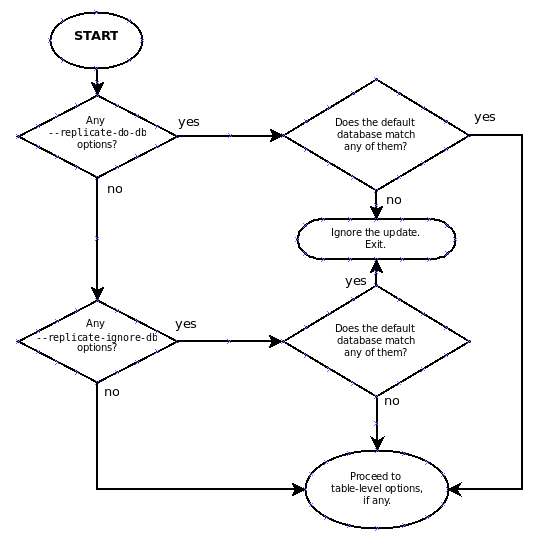
The steps involved are listed here:
Are there any
--replicate-do-dboptions?Yes. Do any of them match the database?
Yes. Execute the statement and exit.
No. Continue to step 2.
No. Continue to step 2.
Are there any
--replicate-ignore-dboptions?Yes. Do any of them match the database?
Yes. Ignore the statement and exit.
No. Continue to step 3.
No. Continue to step 3.
Proceed to checking the table-level replication options, if there are any. For a description of how these options are checked, see Section 14.9.2, “Evaluation of Table-Level Replication Options”.
ImportantA statement that is still permitted at this stage is not yet actually executed. The statement is not executed until all table-level options (if any) have also been checked, and the outcome of that process permits execution of the statement.
For binary logging, the steps involved are listed here:
Are there any
--binlog-do-dbor--binlog-ignore-dboptions?Yes. Continue to step 2.
No. Log the statement and exit.
Is there a default database (has any database been selected by
USE)?Yes. Continue to step 3.
No. Ignore the statement and exit.
There is a default database. Are there any
--binlog-do-dboptions?Yes. Do any of them match the database?
Yes. Log the statement and exit.
No. Ignore the statement and exit.
No. Continue to step 4.
Do any of the
--binlog-ignore-dboptions match the database?Yes. Ignore the statement and exit.
No. Log the statement and exit.
An exception is made in the rules just given for the
CREATE DATABASE,
ALTER DATABASE, and
DROP DATABASE statements. In
those cases, the database being created, altered, or
dropped replaces the default database when
determining whether to log or to ignore updates.
--binlog-do-db can sometimes mean
“ignore other databases”. For example, a server
running with only
--binlog-do-db=sales does not
write to the binary log statements for which the default
database differs from sales.
The slave checks for and evaluates table options only if no matching database options were found (see Section 14.9.1, “Evaluation of Database-Level Replication and Binary Logging Options”).
First, as a preliminary condition, the slave checks whether the statement occurs within a stored function, in which case the slave executes the statement and exits.
Having reached this point, if there are no table options, the
slave simply executes all statements. If there are any
--replicate-do-table or
--replicate-wild-do-table
options, the statement must match one of these if it is to be
executed; otherwise, it is ignored. If there are any
--replicate-ignore-table or
--replicate-wild-ignore-table
options, all statements are executed except those that match any
of these options. This process is illustrated in the following
diagram.
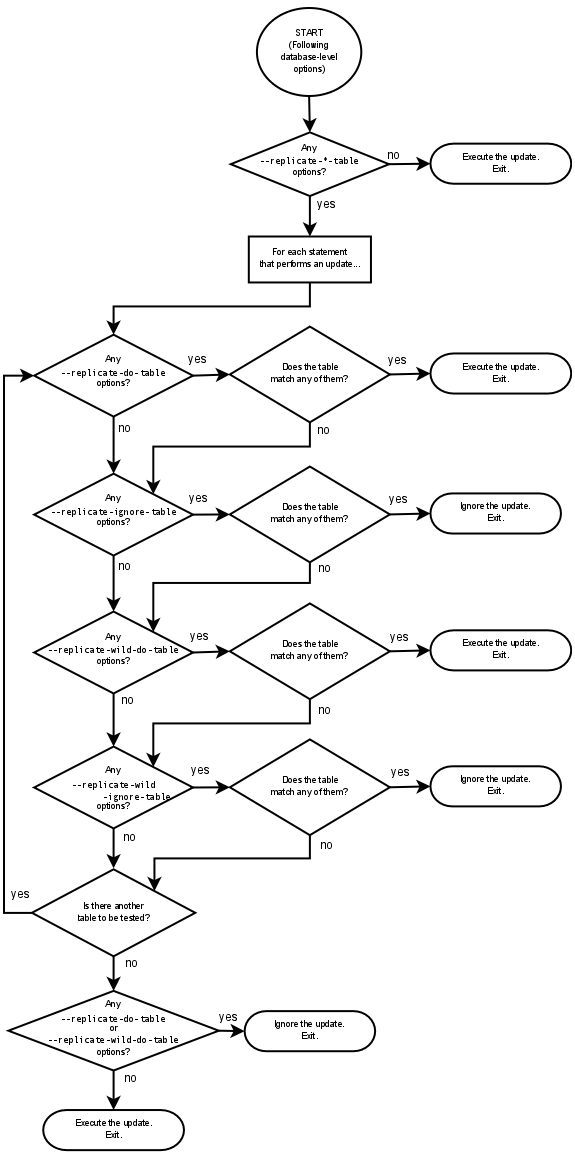
The following steps describe this evaluation in more detail:
Are there any table options?
Yes. Continue to step 2.
No. Execute the statement and exit.
Are there any
--replicate-do-tableoptions?Yes. Does the table match any of them?
Yes. Execute the statement and exit.
No. Continue to step 3.
No. Continue to step 3.
Are there any
--replicate-ignore-tableoptions?Yes. Does the table match any of them?
Yes. Ignore the statement and exit.
No. Continue to step 4.
No. Continue to step 4.
Are there any
--replicate-wild-do-tableoptions?Yes. Does the table match any of them?
Yes. Execute the statement and exit.
No. Continue to step 5.
No. Continue to step 5.
Are there any
--replicate-wild-ignore-tableoptions?Yes. Does the table match any of them?
Yes. Ignore the statement and exit.
No. Continue to step 6.
No. Continue to step 6.
Are there any
--replicate-do-tableor--replicate-wild-do-tableoptions?Yes. Ignore the statement and exit.
No. Execute the statement and exit.
This section provides additional explanation and examples of usage for different combinations of replication filtering options.
Some typical combinations of replication filter rule types are given in the following table:
| Condition (Types of Options) | Outcome |
|---|---|
No --replicate-* options at all: | The slave executes all events that it receives from the master. |
--replicate-*-db options, but no table options: | The slave accepts or ignores statements using the database options. It executes all statements permitted by those options because there are no table restrictions. |
--replicate-*-table options, but no database options: | All statements are accepted at the database-checking stage because there are no database conditions. The slave executes or ignores statements based solely on the table options. |
| A combination of database and table options: | The slave accepts or ignores statements using the database options. Then it evaluates all statements permitted by those options according to the table options. This can sometimes lead to results that seem counterintuitive; see the text for an example. |
A more complex example follows.
Suppose that we have two tables mytbl1 in
database db1 and mytbl2 in
database db2 on the master, and the slave is
running with the following options (and no other replication
filtering options):
replicate-ignore-db = db1 replicate-do-table = db2.tbl2
Now we execute the following statements on the master:
USE db1; INSERT INTO db2.tbl2 VALUES (1);
The outcome may not match initial expectations, because the
USE statement causes db1
to be the default database. Thus the
--replicate-ignore-db option
matches, which causes the INSERT
statement to be ignored. Because there was a match with a
database-level option, the table options are not checked;
processing immediately moves to the next statement executed on
the master.
Q: How do I configure a slave if the master is running and I do not want to stop it?
A: There are several
possibilities. If you have taken a snapshot backup of the master
at some point and recorded the binary log file name and offset
(from the output of SHOW MASTER
STATUS) corresponding to the snapshot, use the following
procedure:
Make sure that the slave is assigned a unique server ID.
Execute the following statement on the slave, filling in appropriate values for each option:
mysql>
CHANGE MASTER TO->MASTER_HOST='->master_host_name',MASTER_USER='->master_user_name',MASTER_PASSWORD='->master_pass',MASTER_LOG_FILE='->recorded_log_file_name',MASTER_LOG_POS=recorded_log_position;Execute
START SLAVEon the slave.
If you do not have a backup of the master server, here is a quick procedure for creating one. All steps should be performed on the master host.
Issue this statement to acquire a global read lock:
mysql>
FLUSH TABLES WITH READ LOCK;With the lock still in place, execute this command (or a variation of it):
shell>
tar zcf /tmp/backup.tar.gz /var/lib/mysqlIssue this statement and record the output, which you will need later:
mysql>
SHOW MASTER STATUS;Release the lock:
mysql>
UNLOCK TABLES;
An alternative to using the preceding procedure to make a binary copy is to make an SQL dump of the master. To do this, you can use mysqldump --master-data on your master and later load the SQL dump into your slave. However, this is slower than making a binary copy.
Regardless of which of the two methods you use, afterward follow the instructions for the case when you have a snapshot and have recorded the log file name and offset. You can use the same snapshot to set up several slaves. Once you have the snapshot of the master, you can wait to set up a slave as long as the binary logs of the master are left intact. The two practical limitations on the length of time you can wait are the amount of disk space available to retain binary logs on the master and the length of time it takes the slave to catch up.
Q: Does the slave need to be connected to the master all the time?
A: No, it does not. The slave can go down or stay disconnected for hours or even days, and then reconnect and catch up on updates. For example, you can set up a master/slave relationship over a dial-up link where the link is up only sporadically and for short periods of time. The implication of this is that, at any given time, the slave is not guaranteed to be in synchrony with the master unless you take some special measures.
Q: How do I know how late a slave is compared to the master? In other words, how do I know the date of the last statement replicated by the slave?
A: If the slave is 4.1.1 or
newer, read the Seconds_Behind_Master column in
SHOW SLAVE STATUS, which shows the
number of seconds that the slave SQL thread is behind processing
the master binary log. A high number (or an increasing one) can
indicate that the slave is unable to cope with the large number of
queries from the master.
A value of 0 for Seconds_Behind_Master can
usually be interpreted as meaning that the slave has caught up
with the master, but there are some cases where this is not
strictly true. For example, this can occur if the network
connection between master and slave is broken but the slave I/O
thread has not yet noticed this—that is,
slave_net_timeout has not yet
elapsed.
It is also possible that transient values for
Seconds_Behind_Master may not reflect the
situation accurately. When the slave SQL thread has caught up on
I/O, Seconds_Behind_Master displays 0; but when
the slave I/O thread is still queuing up a new event,
Seconds_Behind_Master may show a large value
until the SQL thread finishes executing the new event. This is
especially likely when the events have old timestamps; in such
cases, if you execute SHOW SLAVE
STATUS several times in a relatively short peiod, you
may see this value change back and forth repeatedly between 0 and
a relatively large value.
For versions of MySQL prior to 4.1.1, it is possible to determine
how far behind the slave is only if SHOW
SLAVE STATUS on the slave shows that the SQL thread is
running (or for MySQL 3.23, that the slave thread is running), and
that the thread has executed at least one event from the master.
See Section 14.3, “Replication Implementation Details”.
When the slave SQL thread executes an event read from the master,
it modifies its own time to the event timestamp. (This is why
TIMESTAMP is well replicated.) In
the Time column in the output of
SHOW PROCESSLIST, the number of
seconds displayed for the slave SQL thread is the number of
seconds between the timestamp of the last replicated event and the
real time of the slave machine. You can use this to determine the
date of the last replicated event. Note that if your slave has
been disconnected from the master for one hour, and then
reconnects, you may immediately see Time values
like 3600 for the slave SQL thread in SHOW
PROCESSLIST. This is because the slave is executing
statements that are one hour old.
Q: How do I force the master to block updates until the slave catches up?
A: Use the following procedure:
On the master, execute these statements:
mysql>
FLUSH TABLES WITH READ LOCK;mysql>SHOW MASTER STATUS;Record the replication coordinates (the log file name and offset) from the output of the
SHOWstatement.On the slave, issue the following statement, where the arguments to the
MASTER_POS_WAIT()function are the replication coordinate values obtained in the previous step:mysql>
SELECT MASTER_POS_WAIT('log_name',log_offset);The
SELECTstatement blocks until the slave reaches the specified log file and offset. At that point, the slave is in synchrony with the master and the statement returns.On the master, issue the following statement to enable the master to begin processing updates again:
mysql>
UNLOCK TABLES;
Q: What issues should I be aware of when setting up two-way replication?
A: MySQL replication currently does not support any locking protocol between master and slave to guarantee the atomicity of a distributed (cross-server) update. In other words, it is possible for client A to make an update to co-master 1, and in the meantime, before it propagates to co-master 2, client B could make an update to co-master 2 that makes the update of client A work differently than it did on co-master 1. Thus, when the update of client A makes it to co-master 2, it produces tables that are different from what you have on co-master 1, even after all the updates from co-master 2 have also propagated. This means that you should not chain two servers together in a two-way replication relationship unless you are sure that your updates can safely happen in any order, or unless you take care of mis-ordered updates somehow in the client code.
You should also realize that two-way replication actually does not improve performance very much (if at all) as far as updates are concerned. Each server must do the same number of updates, just as you would have a single server do. The only difference is that there is a little less lock contention, because the updates originating on another server are serialized in one slave thread. Even this benefit might be offset by network delays.
Q: How can I use replication to improve performance of my system?
A: You should set up one server
as the master and direct all writes to it. Then configure as many
slaves as you have the budget and rackspace for, and distribute
the reads among the master and the slaves. You can also start the
slaves with the
--skip-innodb,
--skip-bdb,
--low-priority-updates, and
--delay-key-write=ALL options to
get speed improvements on the slave end. In this case, the slave
uses nontransactional MyISAM tables instead of
InnoDB and BDB tables to get
more speed by eliminating transactional overhead.
Q: What should I do to prepare client code in my own applications to use performance-enhancing replication?
A: If the part of your code that is responsible for database access has been properly abstracted/modularized, converting it to run with a replicated setup should be very smooth and easy. Change the implementation of your database access to send all writes to the master, and to send reads to either the master or a slave. If your code does not have this level of abstraction, setting up a replicated system gives you the opportunity and motivation to it clean up. Start by creating a wrapper library or module that implements the following functions:
safe_writer_connect()safe_reader_connect()safe_reader_statement()safe_writer_statement()
safe_ in each function name means that the
function takes care of handling all error conditions. You can use
different names for the functions. The important thing is to have
a unified interface for connecting for reads, connecting for
writes, doing a read, and doing a write.
Then convert your client code to use the wrapper library. This may be a painful and scary process at first, but it pays off in the long run. All applications that use the approach just described are able to take advantage of a master/slave configuration, even one involving multiple slaves. The code is much easier to maintain, and adding troubleshooting options is trivial. You need modify only one or two functions; for example, to log how long each statement took, or which statement among those issued gave you an error.
If you have written a lot of code, you may want to automate the conversion task by using the replace utility that comes with standard MySQL distributions, or just write your own conversion script. Ideally, your code uses consistent programming style conventions. If not, then you are probably better off rewriting it anyway, or at least going through and manually regularizing it to use a consistent style.
Q: When and how much can MySQL replication improve the performance of my system?
A: MySQL replication is most beneficial for a system that processes frequent reads and infrequent writes. In theory, by using a single-master/multiple-slave setup, you can scale the system by adding more slaves until you either run out of network bandwidth, or your update load grows to the point that the master cannot handle it.
To determine how many slaves you can use before the added benefits
begin to level out, and how much you can improve performance of
your site, you need to know your query patterns, and to determine
empirically by benchmarking the relationship between the
throughput for reads (reads per second, or
reads) and for writes
(writes) on a typical master and a typical
slave. The example here shows a rather simplified calculation of
what you can get with replication for a hypothetical system.
Let's say that system load consists of 10% writes and 90% reads,
and we have determined by benchmarking that
reads is 1200 – 2 ×
writes. In other words, the system can do 1,200
reads per second with no writes, the average write is twice as
slow as the average read, and the relationship is linear. Suppose
that the master and each slave have the same capacity, and that we
have one master and N slaves. Then we
have for each server (master or slave):
reads = 1200 – 2 ×
writes
reads = 9 × writes /
(N + 1) (reads are split, but writes
replicated to all slaves)
9 × writes /
(N + 1) + 2 ×
writes = 1200
writes = 1200 / (2 +
9/(N + 1))
The last equation indicates the maximum number of writes for
N slaves, given a maximum possible read
rate of 1,200 per minute and a ratio of nine reads per write.
This analysis yields the following conclusions:
If
N= 0 (which means we have no replication), our system can handle about 1200/11 = 109 writes per second.If
N= 1, we get up to 184 writes per second.If
N= 8, we get up to 400 writes per second.If
N= 17, we get up to 480 writes per second.Eventually, as
Napproaches infinity (and our budget negative infinity), we can get very close to 600 writes per second, increasing system throughput about 5.5 times. However, with only eight servers, we increase it nearly four times.
Note that these computations assume infinite network bandwidth and
neglect several other factors that could be significant on your
system. In many cases, you may not be able to perform a
computation similar to the one just shown that accurately predicts
what will happen on your system if you add
N replication slaves. However,
answering the following questions should help you decide whether
and by how much replication will improve the performance of your
system:
What is the read/write ratio on your system?
How much more write load can one server handle if you reduce the reads?
For how many slaves do you have bandwidth available on your network?
Q: How can I use replication to provide redundancy or high availability?
A: With the currently available features, you would have to set up a master and a slave (or several slaves), and to write a script that monitors the master to check whether it is up. Then instruct your applications and the slaves to change master in case of failure. Some suggestions:
To tell a slave to change its master, use the
CHANGE MASTER TOstatement.A good way to keep your applications informed as to the location of the master is by having a dynamic DNS entry for the master. With
bindyou can usensupdateto dynamically update your DNS.Run your slaves with the
--log-binoption and without--log-slave-updates. In this way, the slave is ready to become a master as soon as you issueSTOP SLAVE;RESET MASTER, andCHANGE MASTER TOstatement on the other slaves. For example, assume that you have the following setup:WC \ v WC----> M / | \ / | \ v v v S1 S2 S3In this diagram,
Mmeans the master,Sthe slaves,WCthe clients issuing database writes and reads; clients that issue only database reads are not represented, because they need not switch.S1,S2, andS3are slaves running with--log-binand without--log-slave-updates. Because updates received by a slave from the master are not logged in the binary log unless--log-slave-updatesis specified, the binary log on each slave is empty initially. If for some reasonMbecomes unavailable, you can pick one of the slaves to become the new master. For example, if you pickS1, allWCshould be redirected toS1, which will log updates to its binary log.S2andS3should then replicate fromS1.The reason for running the slave without
--log-slave-updatesis to prevent slaves from receiving updates twice in case you cause one of the slaves to become the new master. Suppose thatS1has--log-slave-updatesenabled. Then it will write updates that it receives fromMto its own binary log. WhenS2changes fromMtoS1as its master, it may receive updates fromS1that it has already received fromMMake sure that all slaves have processed any statements in their relay log. On each slave, issue
STOP SLAVE IO_THREAD, then check the output ofSHOW PROCESSLISTuntil you seeHas read all relay log. When this is true for all slaves, they can be reconfigured to the new setup. On the slaveS1being promoted to become the master, issueSTOP SLAVEandRESET MASTER.On the other slaves
S2andS3, useSTOP SLAVEandCHANGE MASTER TO MASTER_HOST='S1'(where'S1'represents the real host name ofS1). To useCHANGE MASTER TO, add all information about how to connect toS1fromS2orS3(user,password,port). InCHANGE MASTER TO, there is no need to specify the name of theS1binary log file or log position to read from: We know it is the first binary log file and position 4, which are the defaults forCHANGE MASTER TO. Finally, useSTART SLAVEonS2andS3.Then instruct all
WCto direct their statements toS1. From that point on, all updates statements sent byWCtoS1are written to the binary log ofS1, which then contains every update statement sent toS1sinceMdied.The result is this configuration:
WC / | WC | M(unavailable) \ | \ | v v S1<--S2 S3 ^ | +-------+When
Mis up again, you must issue on it the sameCHANGE MASTER TOas that issued onS2andS3, so thatMbecomes a slave ofS1and picks up all theWCwrites that it missed while it was down. To makeMa master again (because it is the most powerful machine, for example), use the preceding procedure as ifS1was unavailable andMwas to be the new master. During this procedure, do not forget to runRESET MASTERonMbefore makingS1,S2, andS3slaves ofM. Otherwise, they may pick up oldWCwrites from before the point at whichMbecame unavailable.Note that there is no synchronization between the different slaves to a master. Some slaves might be ahead of others. This means that the concept outlined in the previous example might not work. In practice, however, the relay logs of different slaves will most likely not be far behind the master, so it would work, anyway (but there is no guarantee).
Q: How do I prevent GRANT and REVOKE statements from replicating to slave machines?
A: Start the server with the
--replicate-wild-ignore-table=mysql.%
option.
Q: Does replication work on mixed operating systems (for example, the master runs on Linux while slaves run on Mac OS X and Windows)?
A: Yes.
Q: Does replication work on mixed hardware architectures (for example, the master runs on a 64-bit machine while slaves run on 32-bit machines)?
A: Yes.
If you have followed the instructions but your replication setup is not working, the first thing to do is check the error log for messages. Many users have lost time by not doing this soon enough after encountering problems.
If you cannot tell from the error log what the problem was, try the following techniques:
Verify that the master has binary logging enabled by issuing a
SHOW MASTER STATUSstatement. If logging is enabled,Positionis nonzero. If binary logging is not enabled, verify that you are running the master with the--log-binoption.Verify that the master and slave both were started with the
--server-idoption and that the ID value is unique on each server.Verify that the slave is running. Use
SHOW SLAVE STATUSto check whether theSlave_IO_RunningandSlave_SQL_Runningvalues are bothYes. If not, verify the options that were used when starting the slave server. For example,--skip-slave-startprevents the slave threads from starting until you issue aSTART SLAVEstatement.If the slave is running, check whether it established a connection to the master. Use
SHOW PROCESSLIST, find the I/O and SQL threads and check theirStatecolumn to see what they display. See Section 14.3, “Replication Implementation Details”. If the I/O thread state saysConnecting to master, verify the privileges for the replication user on the master, the master host name, your DNS setup, whether the master is actually running, and whether it is reachable from the slave.If the slave was running previously but has stopped, the reason usually is that some statement that succeeded on the master failed on the slave. This should never happen if you have taken a proper snapshot of the master, and never modified the data on the slave outside of the slave thread. If the slave stops unexpectedly, it is a bug or you have encountered one of the known replication limitations described in Section 14.7, “Replication Features and Issues”. If it is a bug, see Section 14.12, “How to Report Replication Bugs or Problems”, for instructions on how to report it.
If a statement that succeeded on the master refuses to run on the slave, try the following procedure if it is not feasible to do a full database resynchronization by deleting the slave's databases and copying a new snapshot from the master:
Determine whether the affected table on the slave is different from the master table. Try to understand how this happened. Then make the slave's table identical to the master's and run
START SLAVE.If the preceding step does not work or does not apply, try to understand whether it would be safe to make the update manually (if needed) and then ignore the next statement from the master.
If you decide that the slave can skip the next statement from the master, issue the following statements:
mysql>
SET GLOBAL SQL_SLAVE_SKIP_COUNTER =mysql>N;START SLAVE;The value of
Nshould be 1 if the next statement from the master does not useAUTO_INCREMENTorLAST_INSERT_ID(). Otherwise, the value should be 2. The reason for using a value of 2 for statements that useAUTO_INCREMENTorLAST_INSERT_ID()is that they take two events in the binary log of the master.See also Section 12.5.2.6, “SET GLOBAL SQL_SLAVE_SKIP_COUNTER Syntax”.
If you are sure that the slave started out perfectly synchronized with the master, and that no one has updated the tables involved outside of the slave thread, then presumably the discrepancy is the result of a bug. If you are running the most recent version of MySQL, please report the problem. If you are running an older version, try upgrading to the latest production release to determine whether the problem persists.
When you have determined that there is no user error involved, and replication still either does not work at all or is unstable, it is time to send us a bug report. We need to obtain as much information as possible from you to be able to track down the bug. Please spend some time and effort in preparing a good bug report.
If you have a repeatable test case that demonstrates the bug, please enter it into our bugs database using the instructions given in Section 1.8, “How to Report Bugs or Problems”. If you have a “phantom” problem (one that you cannot duplicate at will), use the following procedure:
Verify that no user error is involved. For example, if you update the slave outside of the slave thread, the data goes out of synchrony, and you can have unique key violations on updates. In this case, the slave thread stops and waits for you to clean up the tables manually to bring them into synchrony. This is not a replication problem. It is a problem of outside interference causing replication to fail.
Run the slave with the
--log-slave-updatesand--log-binoptions. These options cause the slave to log the updates that it receives from the master into its own binary logs.Save all evidence before resetting the replication state. If we have no information or only sketchy information, it becomes difficult or impossible for us to track down the problem. The evidence you should collect is:
All binary log files from the master
All binary log files from the slave
The output of
SHOW MASTER STATUSfrom the master at the time you discovered the problemThe output of
SHOW SLAVE STATUSfrom the slave at the time you discovered the problemError logs from the master and the slave
Use mysqlbinlog to examine the binary logs. The following should be helpful to find the problem statement.
log_fileandlog_posare theMaster_Log_FileandRead_Master_Log_Posvalues fromSHOW SLAVE STATUS.shell>
mysqlbinlog --start-position=log_poslog_file| head
After you have collected the evidence for the problem, try to isolate it as a separate test case first. Then enter the problem with as much information as possible into our bugs database using the instructions at Section 1.8, “How to Report Bugs or Problems”.